SSVC Implementation in FutureVuls#
CSIRT / PSIRT Plan Only
The SSVC feature is available only on the CSIRT Plan and the PSIRT Plan. It is enabled by default on the CSIRT Plan. On the PSIRT Plan, you can enable it by following "Enabling the SSVC Feature".
SSVC (Stakeholder-Specific Vulnerability Categorization) is a framework for determining response priority for vulnerability management. The FutureVuls CSIRT Plan includes SSVC as an indicator for determining vulnerability response priority, allowing for the use of an automatic triage feature. By using SSVC, you can assess the actual risk and automatically determine specific response actions, such as task priority, task due date, and task status, based on pre-configured rules.
This article covers how SSVC is implemented in FutureVuls.
For details on SSVC theory, please refer to "Glossary".
- September 2022
- FutureVuls released the SSVC feature.
- Press Release (in Japanese)
- October 2024
- Support for SSVC v2.1 was added.
- Release Notes (in Japanese)
Enabling the SSVC Feature#
On the CSIRT Plan, SSVC is enabled by default, so this step is not required. To use SSVC on the PSIRT Plan, enable the feature for your organization.
Go to Organization Settings > SSVC.
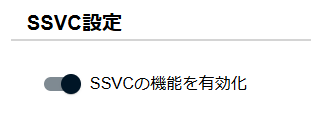
In SSVC Settings, click "Enable SSVC" and approve the confirmation dialog to activate SSVC for the organization.
Response Priority#
FutureVuls assigns one of the following four priority levels (SSVC Priority) to detected vulnerabilities.
| SSVC Priority | Description |
|---|---|
| Immediate | Concentrate all resources and, if necessary, halt normal organizational operations to respond as quickly as possible. |
| Out-of-Cycle | Act faster than usual and implement mitigation or remediation measures at unplanned opportunities. |
| Scheduled | Address during regular maintenance. |
| Defer | Do not address at this time. |
Based on this prioritization, you can respond immediately to high-priority items or defer low-priority or negligible issues.
When SSVC Priority is Calculated
In FutureVuls, this SSVC Priority is derived for each task at the time a vulnerability is detected.
When the vulnerability database is updated due to new threat intelligence, etc., SSVC is normally recalculated to reflect these changes during the next scan, and the task is updated.
However, when a previously detected vulnerability is newly added to KEV, or its Exploitation changes to active based on information other than KEV, eligible servers are re-matched using their previous scan results without waiting for the next scan.
This re-matching also updates the SSVC Priority and due date.
For eligible servers and update timing, see "Automatic Re-matching When Threat Information Changes".
SSVC Recalculation for Closed Tasks (Effective July 14, 2025)
As of the July 14, 2025 release, SSVC is now recalculated during scans for tasks with WORKAROUND and RISK_ACCEPTED statuses. This allows for appropriate re-evaluation in response to changes in risk assessment. Tasks with PATCH_APPLIED, ALT_RESOLVED, or NOT_AFFECTED statuses remain excluded from SSVC recalculation.
How SSVC Priority is Derived#
The SSVC Priority is derived using an SSVC decision tree. Specifically, it considers the combination of the following four items (hereafter referred to as Decision Points) to derive the SSVC Priority.
flowchart LR
    classDef autoStyle fill:#4caf5088,stroke:#4caf50,stroke-width:2px
    classDef manualStyle fill:#ff980088,stroke:#ff9800,stroke-width:2px
    classDef resultStyle fill:#42a5f588,stroke:#2196f3,stroke-width:2px

    A["Exploitation<br>Availability of exploit code"]:::autoStyle --> E
    B["Automatable<br>Feasibility of automated attack"]:::autoStyle --> E
    C["Exposure<br>Exposure of vulnerable component"]:::manualStyle --> E
    D["Human Impact<br>Business impact of an attack"]:::manualStyle --> E

    E{"SSVC Decision Tree"} --> F["Immediate<br>Respond immediately"]:::resultStyle
    E --> G["Out-of-Cycle<br>Respond promptly, unplanned"]:::resultStyle
    E --> H["Scheduled<br>Respond during scheduled maintenance"]:::resultStyle
E --> I["Defer<br>Do not respond at this time"]:::resultStyle- 🟢 Green: Decision Points automatically derived by FutureVuls
- 🟠 Orange: Decision Points manually configured by the user based on their system environment
| Decision Point | Description | Configuration Method |
|---|---|---|
| Exploitation | The availability of exploit code and its level of exploitation | Automatically derived |
| Exposure | The level of exposure of the vulnerable component | Manually configured |
| Automatable | The automatability of an attack | Automatically derived |
| Human Impact | The business impact if an attack occurs | Manually configured |
Decision Points related to the vulnerability itself (Exploitation, Automatable) are automatically derived based on information collected by FutureVuls.
On the other hand, Decision Points related to system-specific environmental values (Exposure, Human Impact) need to be configured by the user according to their system environment.
Decision Points Automatically Derived by FutureVuls
The two Decision Points automatically derived by FutureVuls are Exploitation and Automatable.
The derivation methods for each are explained below.
Exploitation is a Decision Point that evaluates the presence and reliability of threat intelligence and exploit code.
In FutureVuls, the determination is made using the following logic:
| Exploitation Value | Description |
|---|---|
| active | - Listed in CISA KEV - Listed in VulnCheck KEV - Listed in ENISA KEV - MSRC Exploitability: Detected- Vulnrichment SSVC Exploitation: active |
| poc | If none of the above apply: - Exploit code (Metasploit, Exploit-DB, etc.) exists - An alert has been issued by JPCERT/CC or CISA* - MSRC Exploitability: More Likely- Vulnrichment SSVC Exploitation: poc |
| none | Anything else (no alerts, threat intelligence, or exploit code has been published) |
- However, if the only condition met for
pocis "JPCERT/CC's advisory for Windows periodic security patches," it is treated as an exception and classified asnone(Reference (in Japanese)).
Automatable is a Decision Point that determines whether an attacker can automate an attack. FutureVuls determines whether a vulnerability is automatable (Automatable=yes) in the following order of precedence.
-
If the vulnerability is registered in Vulnrichment and the SSVC fields are populated, its Automatable value is used.
-
If the CVSS v4 supplemental metric "Automatable (AU)" is provided, its value is used (
AU:Ymeans automatable,AU:Nmeans not automatable). -
If none of the above apply, potential RCE vulnerabilities are extracted.
- Vulnerabilities that meet the following conditions are extracted:
- For vulnerability information published by MSRC, the impact description is stated as Remote Code Execution.
- The vulnerability summary in various vulnerability databases states that remote arbitrary code execution is possible.
- The listed potential RCE CVEs are further filtered:
- Those that can be determined as automatable from the CVSS (v2, v3, or v4) vector.
- For CVSSv4, meets the following conditions:
- Attack Vector (AV) is Network (N)
- Attack Complexity (AC) is Low (L)
- Attack Requirements (AT) is None (N)
- Privileges Required (PR) is None (N)
- User Interaction (UI) is None (N)
- For CVSSv3, meets the following conditions:
- Attack Vector (AV) is Network (N)
- Attack Complexity (AC) is Low (L)
- Privileges Required (PR) is None (N)
- User Interaction (UI) is None (N)
- For CVSSv2, meets the following conditions:
- Attack Vector (AV) is Network (N)
- Attack Complexity (AC) is Low (L)
- Authentication (Au) is None (N)
- For CVSSv4, meets the following conditions:
- Those that can be determined as automatable from the CVSS (v2, v3, or v4) vector.
Expanded the data sources for Exploit (PoC) (June 3, 2026 release)
In the June 3, 2026 release, Trickest and Nuclei were added to the data sources for the Exploit (attack code / PoC) information used to determine Exploitation. As a result, PoCs may now be newly associated with vulnerabilities for which no Exploit information had previously been found, which may increase the number of vulnerabilities whose Exploitation is determined to be poc. For details, see the "2026-06-03 release notes".
Configuring SSVC Decision Points#
Among the Decision Points required to calculate SSVC Priority, it is recommended to configure Exposure and Human Impact according to the managed system environment.
These can be set from Decision Point in the group settings and role settings.
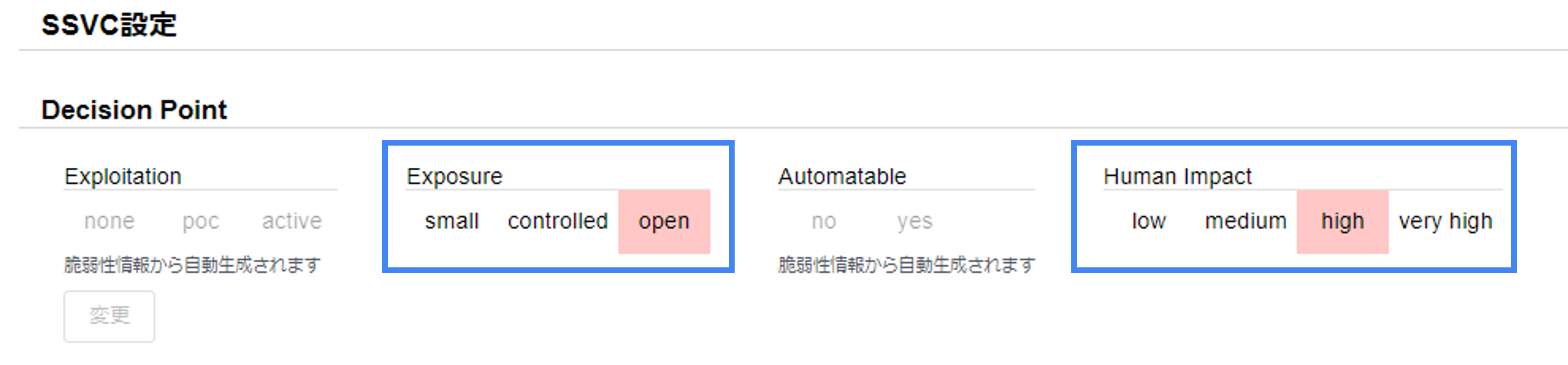
"Decision Point" displays the SSVC decision tree.
Click the values you want to set in the Exposure and Human Impact columns to select them, then click the Apply button to apply the settings.
The Exploitation and Automatable columns are automatically derived from vulnerability information and cannot be selected.
Default Values
Default values are set in advance for the Exposure and Human Impact Decision Points.
Therefore, even if these system-specific values are not individually configured, the SSVC Priority itself will be calculated.
However, configuring them individually allows for a more accurate SSVC Priority calculation, so it is recommended.
Applying Configuration Changes
If you change Exposure or Human Impact, the task's SSVC Priority will be updated during the next scan.
To derive the SSVC Priority based on the latest settings, either wait for the next scheduled scan or, if you are in a hurry, perform another scan from Group Settings > Manual Scan of All Servers.
How to Configure Exposure#
Exposure is a Decision Point for setting the internet exposure level of the target system.
| Exposure Level | Description |
|---|---|
| Small | Local services/programs. Highly controlled networks. Isolated environments with no internet connectivity. - Isolated environments where internet input/output is prohibited. |
| Controlled | Networks where some access restrictions and mitigation measures are in place. - Internet-facing but with IP restrictions. - Servers not directly facing the internet (e.g., DB servers). |
| Open | The internet or networks where access cannot be restricted or controlled (e.g., DNS servers, web servers, VOIP servers, email servers). - Servers facing the internet with open ports accessible without restriction. - Services discoverable by external scanning tools like Shodan or Nessus. - Client PCs connecting to the web or email without standard protections (blocking malicious IPs/URLs, firewalls). |
Deciding whether a server exposed to the internet but protected by a WAF, IPS, EDR, etc., is Open or Controlled can be difficult, but the Exposure for internet-exposed servers should be Open.
The protective capability of these security products fundamentally depends on the rules actually applied, and rules for all known vulnerabilities are not available.
Furthermore, immediate response to newly disclosed critical vulnerabilities has its limits, making it difficult to completely prevent attacks from the internet.
For this reason, set the Exposure for internet-exposed servers to Open and classify them using SSVC.
For vulnerabilities identified as Immediate or Out-of-Cycle by SSVC, it is appropriate to check the protection status of security products and then decide on the subsequent response.
For guidance on configuring Exposure and methods for automatic investigation using Inspector, please refer to the FutureVuls blog post "Automated Identification of Internet-Exposed Servers and SSVC Exposure Configuration Guide (in Japanese)".
How to Configure Human Impact#
Human Impact is a Decision Point for setting the business impact of an attack.
| Human Impact Value | Description |
|---|---|
| Low | Almost no impact. Examples: PCs, development environments, etc. |
| Medium | No impact on core business operations. Example: Time and attendance management system. |
| High | A single core business operation is affected for an extended period. Examples: A single core system, a single web service. |
| Very High | A critical system where multiple core business operations are halted, making the entire company's core operations unrecoverable. Examples: Online banking or trading systems. |
For guidance on configuring Human Impact, please refer to the FutureVuls blog post "Example Method for Determining Human Impact in SSVC (in Japanese)".
You can also check the value and source of each Decision Point from Show decision points under SSVC in the task's second pane. For more information, see Task > SSVC.
Overwriting with Roles#
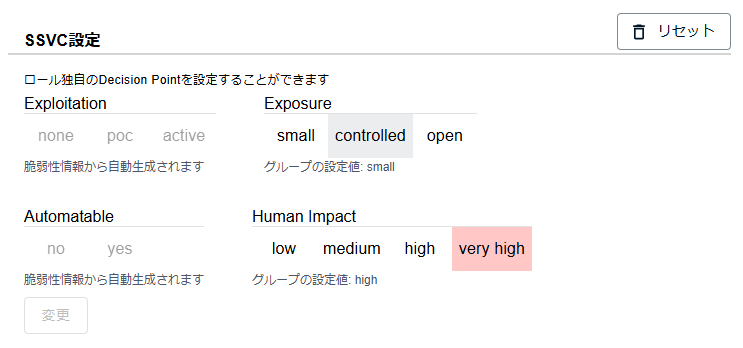
Using roles, you can overwrite Decision Points on a per-server basis. This allows for more granular configuration of Decision Points by setting default values for the entire system in the group settings and then overwriting them for individual servers using roles.
In "SSVC Settings" on the role details, select values in the decision tree in the same way as in the group settings, then click the Apply button.
If no values are set for the role, the values set for the group are displayed with a bold border, and those values are used to calculate the SSVC Priority.
After setting Decision Point values for each role, if you want to revert to the group's Decision Point values, you can do so by clicking the Reset button displayed in the upper right of "SSVC Settings".
Triggers & Actions#
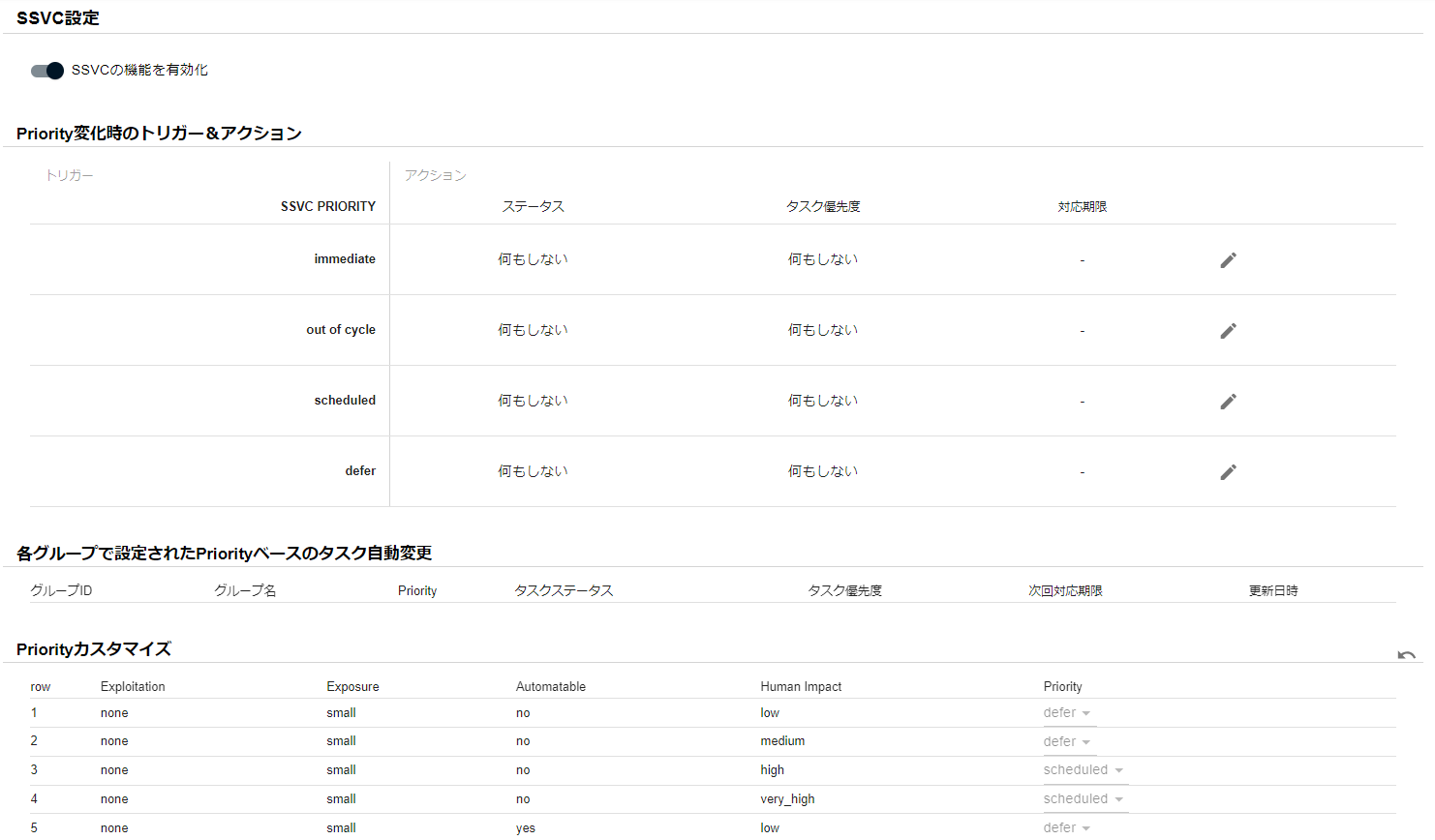
You can define "actions to execute when the SSVC Priority differs from the previous one."
When an SSVC Priority is derived, you can automatically update the task's status, priority, and due date according to the priority.
For example, for Immediate tasks, you can automatically set the priority to High and the due date to 3 days from detection, enabling further automation and reducing manual effort.
For details, refer to CSIRT Plan > Automatic Triage > Advanced Automatic Triage using SSVC.
This section explains the settings for using the SSVC Triggers & Actions feature.
Applying Configuration Changes
When you change SSVC Triggers & Actions, the new actions are applied automatically. For details, please see "20240401 Release Notes /#automatically-apply-new-actions-when-ssvc-trigger-actions-are-changed (in Japanese)".
Triggers & Actions for when the SSVC Priority changes are configured in Organization Settings > SSVC.
Configuring Triggers & Actions#
Status#
If Status is configured, the content of tasks that are new, in progress, or on hold will be updated when the derived SSVC Priority is updated.
If a task is newly identified with a high priority like immediate or out of cycle, you can automatically reset the task status to new, which is a recommended setting.
new tasks are categorized under the "Open" status in the vulnerability and task list sub-menus, allowing you to recognize them as tasks requiring re-triage.
For tasks identified with a lower priority like scheduled or defer, you can automatically set the task status to defer or risk_accepted.
Conditions for Updating Task Status
Task statuses that can be updated by SSVC are those that are not in a completed state (see below).
- NOT_AFFECTED
- PATCH_APPLIED
As of the July 14, 2025 release, SSVC is recalculated during scans even for tasks with WORKAROUND and RISK_ACCEPTED statuses.
For information on task status types, please check "Task Status".
Priority#
If priority is configured, the task's priority will be automatically updated when the SSVC Priority is derived.
Due Date#
Automatically updates the task's due date when the SSVC Priority is derived.
Tasks that have passed their due date can be checked in lists and email notifications, helping to prevent missed responses.
Since immediate and out of cycle are high priority and should be addressed outside of regular maintenance, please specify a due date like "X days after SSVC Priority derivation."
For scheduled and defer, since it is sufficient to address them during regular maintenance, please specify the regular maintenance cycle using a cron expression.
Conditions for Updating Due Date
SSVC updates the due date only when both of the following are true:
- The current due date was not set by a Special Alert Tag or manually.
- One of the following applies:
- The due date is not set.
- The new due date is earlier than the current one.
- The current due date has passed.
A due date set manually is never overwritten by SSVC. The displayed due date follows the priority "Special Alert Tag > Manual > SSVC" (see Update Task). If the SSVC Priority changes after a due date set by SSVC has passed, the due date may move to a later date.
Overwriting in Group Settings#
You can override the Triggers & Actions settings defined at the organization level with group-specific settings. Therefore, it is recommended to set default response policies through Triggers & Actions for the entire organization, and then adjust settings at the group level as needed for operational reasons.
When you override settings, you can see a list of which groups are overriding which settings from the organization settings screen.
Customizing the SSVC Decision Tree#
FutureVuls allows for the customization of the decision tree used to calculate SSVC Priority. A default decision tree is configured, but you should customize it if you determine that the SSVC derivation logic needs to be changed based on operational needs.
Applying Customizations
If you customize the decision tree, the task's SSVC Priority will be updated during the next scan.
Either wait for the next scheduled scan or, if you are in a hurry, perform another scan from Group Settings > Manual Scan of All Servers.
Overwriting in Group Settings#
You can further override the SSVC decision tree settings customized at the organization level on a per-group basis. Customize this if you determine that the SSVC derivation results need to be changed for individual groups based on operational needs.