Periodic Automatic Scans#
Overview#
Periodic automatic scans are performed by FutureVuls once a day, during late-night hours. These scans only perform the matching process (B) between each server's configuration information and the latest vulnerability database.
For a complete overview of scanning, please refer to "Scanning in FutureVuls".
Target Servers#
The targets for periodic automatic scans are as follows.
| Plan | Target Servers |
|---|---|
| CSIRT Plan | All servers |
| Standard Plan | Only servers added using the following methods |
Methods for adding servers to be targeted by periodic automatic scans on the Standard Plan:
- Add Pseudo Server
- Add EC2 Instances (Inspector integration)
- Integrate with Container Registry (ECR)
- Integrate with Container Registry (GCP Artifact Registry)
Execution Timing#
Scans are performed once a day, between approximately 00:00 and 08:00 JST.
Skip Conditions#
Applied since the 2026-04-06 release
Since the 2026-04-06 Hotfix release, periodic automatic scans have been skipped for servers that meet the following conditions. The purpose is to reduce the load on the overall system, and no configuration changes are required on your side.
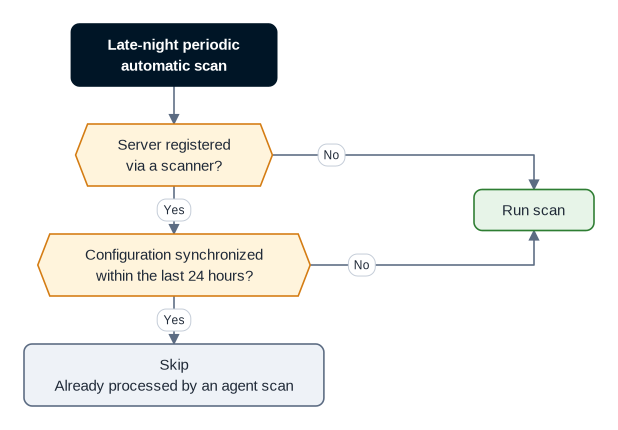
Servers that meet both of the following conditions will be excluded (skipped) from periodic automatic scans.
- Servers registered via a scanner
- Servers whose configuration information has been successfully synchronized by an agent within the last 24 hours
This is because there is no need to re-process servers whose matching process (B) has already been completed by an agent scan.
Cases That Are Not Skipped
The following servers are subject to periodic automatic scans regardless of the conditions above.
- Servers added via AWS integration (Inspector integration)
- Servers added via container registry integration
- Servers where a manual scan was run
Impact of Skipping
Even if a scan is skipped, the guarantee of "one scan per server per day" is still maintained in most cases.
However, if agent synchronization of configuration information stops for any reason, the scan interval may extend to up to approximately 2 days.
Notes on Skipping Periodic Automatic Scans#
If you have operations like the following, they may be affected by the skip conditions.
- Operations that check the latest status based on the schedule of periodic automatic scans.
- Operations that intentionally offset the scanner's execution time from the periodic automatic scan time to ensure multiple scans per day.
If you have any operational concerns, we can suggest alternative measures such as adjusting the scanner's execution time or running scans via the API. Please feel free to contact our User Support.