Inquiries#
Support Desk#
FutureVuls uses "Zendesk" as its communication channel for user support. For instructions on how to use Zendesk, please refer to the "How to Use Zendesk" page.
Tips for Making Inquiries#
FutureVuls aims to respond to your inquiries promptly and accurately. However, if the information provided in your question is insufficient or the prerequisites are unclear, it may take longer to resolve the issue. This page summarizes tips for using our support services more effectively.
- Requesting a New Feature
- Please Use the "FAQ" and Search Functions
- Please Always Update Your Scanner to the Latest Version
- Please Provide Details About the Situation
- Please Include Only One Question Per Inquiry
- Please Make Inquiries with Ample Time
- Please Use the Inquiry History Sharing Feature
1. Requesting a New Feature#
Please make your request from the "Feature Addition Request" page.
When submitting a request, please provide the following information in as much detail as possible. The more details you provide, the faster we can evaluate your request.
- Background of the feature request: The specific situations in which you need this feature, and the problems you are experiencing
- Feature details: A specific description of the desired feature and the steps involved in using it
- Expected benefits: Specific improvements the feature would bring, and new work it would make possible
- Frequency of use: How often you expect to use this feature
- Similar products or features: Information about other products or features that could serve as a reference
Submitted requests are evaluated when we plan each regular release, which takes place every one to two months; at that time, we reprioritize the backlog of requests based on their impact and importance. Please note that not all requests will be implemented, and we cannot promise an implementation timeline.
2. Please Use the "FAQ" and Search Functions#
The "FAQ" page categorizes questions we have received in the past. Please use it to help resolve your issues.
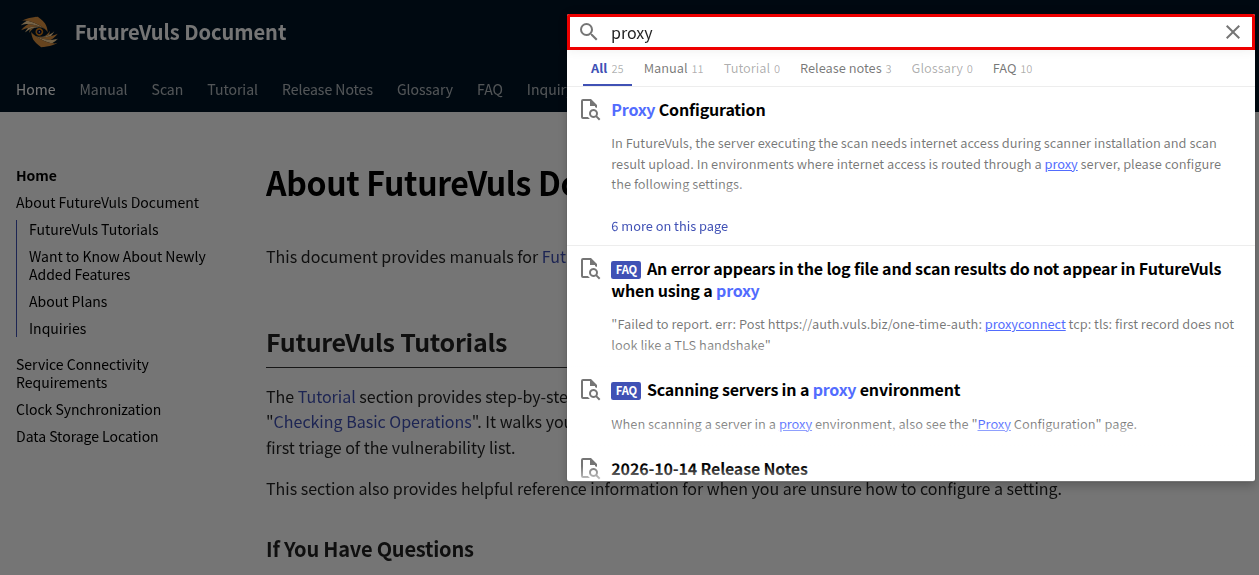
Additionally, you can search the documents within the help pages using the search bar at the top of the help page. By entering the name of the feature you have a question about, you may find information that leads to a solution, so please take advantage of this feature. The search results also include "FAQ" articles, and you can narrow them down to the manual, FAQ, and other categories using the category buttons below the search box.
3. Please Always Update Your Scanner to the Latest Version#
If your scanner version is old and a scanner issue is suspected, updating to the latest version may resolve the problem. Before making an inquiry, please try "updating the scanner to the latest version" and see if the problem occurs again. Note that fixes for the FutureVuls scanner are applied only to the latest version. Fixes for older versions of the scanner will not be provided.
4. Please Provide Details About the Situation#
The support team needs to identify the cause and reproduce the issue based on the content of your inquiry. Providing specific details about the situation will expedite the resolution.
For inquiries about problems that can be seen on the FutureVuls screen, please enter the URL where the problem is occurring in the inquiry form. The URL contains IDs for the target organization, group, server, task, etc., which helps in identifying the target.

Also, if it's difficult to describe in words, attaching screenshots or videos makes it easier for us to understand the problem.
- Date and time the problem occurred (from when to when it has been occurring) and the frequency
- Background, history, and phenomenon of the problem (screen name, operation details, error messages, etc.)
- What you want to achieve, your goal
- What you have already tried to resolve the problem
- For inquiries related to scanning, the following log files (please mask any parts that are difficult to share with "X", etc.)
- linux: scan.log, report.log, vuls-saas.log, config.toml (in
/opt/vuls-saas/) - windows: vuls-windows, vuls-saas.log, config.toml, saas-credential.json, batch_config.toml (in
C:\Program Files\vuls-saas\)
- linux: scan.log, report.log, vuls-saas.log, config.toml (in
Example 1#
| Recommended | Inquiry Content |
|---|---|
| × | An error occurred during the scan. <No attachments> |
| ○ | Around hh:00 on mm/dd, I ran a manual scan on a Linux server under a proxy, but the results are not showing in FutureVuls. I uninstalled the scanner, then reinstalled and ran it again, but the problem was not resolved. Please advise on how to complete the vulnerability scan and have the results appear in FutureVuls. <Attachments> scan.log, report.log, config.toml |
Example 2#
| Recommended | Inquiry Content |
|---|---|
| × | A certain user failed to log in. |
| ○ | The user with the registered email address ~ failed to log in. The user who cannot log in has owner privileges for the organization and uses SSO login as the login method. Please investigate. |
5. Please Include Only One Question Per Inquiry#
If you have multiple questions, please create a new ticket for each question from the "Zendesk Inquiry Page". We assign a dedicated team member to each question and manage the status of each ticket to prevent missed responses. When a question is resolved, that ticket is closed, reducing the risk of missed replies.
If you include multiple questions in one ticket, they may be overlooked or miscommunications may occur due to the timing of replies, so please be sure to create a separate ticket for each question.
Note: However, for multiple questions that are closely related, you may include them in a single inquiry.
6. Please Make Inquiries with Ample Time#
For inquiries about FutureVuls, we generally respond within 2 business days of receiving the inquiry. However, depending on the content, we may ask for additional information or take longer than usual for further investigation. This is not a guaranteed period for resolving all issues, so please submit your inquiries well in advance.
Also, we handle questions in the order they are received, so adding notes like "Urgent" or "Important" will not change the order of response.
The "FutureVuls" service specification is available "here".
7. Sharing Inquiry History within the Same Organization#
By "registering as a user" with FutureVuls Support, you can view your own past inquiry history and inquiries from other users in your organization.
- A FutureVuls Support account is different from a regular FutureVuls account.
- There is no cost associated with registering for a FutureVuls Support account.
- The setting to share inquiry content within the same organization can be turned ON or OFF. The default is OFF, so if you want to turn it ON, please send a request from "here".
- Please note that inquiries that have been resolved for more than 120 days cannot be shared within the organization, even if the sharing setting is turned ON.
For more detailed instructions, please refer to the "How to Use Zendesk" page.
About Tickets Not Covered by Support#
Some inquiries are not covered by FutureVuls' standard support service. This page provides some examples of inquiries that are not covered by support.
For details on the scope of what is not covered by support, please refer to the "Standard Support Service Provision Conditions" in the service specification.
Inquiries about scan results older than 10 days#
Due to internal data retention periods, investigating vulnerability scan results from more than 10 days ago is difficult, and is generally not covered by support. Also, even if an investigation is possible, we cannot guarantee its accuracy, so please be aware of this in advance.
Inquiries about deleted servers#
Investigating deleted servers is difficult to reproduce and is generally not covered by support. Also, even if an investigation is possible, we cannot guarantee its accuracy, so please be aware of this in advance.
Inquiries about OSS Vuls#
Inquiries regarding the specifications of OSS Vuls as a standalone tool, unrelated to FutureVuls, are not covered by support. Please refer to the OSS Vuls documentation or file an Issue.
However, inquiries about OSS Vuls specifications related to the functionality or operation of FutureVuls are covered by support.
Inquiries about OS, middleware, or scanners not in the supported environment#
Inquiries regarding OS, libraries, middleware, etc., that are not listed in the supported environments are not covered by support.
Please also refer to the relevant section of the service specification.
Inquiries about operations other than those provided by FutureVuls#
Operations that deviate from the standard procedures provided by FutureVuls, such as installing the scanner with a custom script, are not covered by support. If you wish to use a non-standard procedure, please let us know the reason. We may consider supporting it depending on the content.
For more details, please also refer to the relevant section of the service specification.
Inquiries not directly related to the FutureVuls service#
We do not accept inquiries that are not directly related to the FutureVuls service, such as the following:
- Network issues
- Example: Please advise on how to deal with being unable to pass through a proxy.
- OS/server-specific issues
- Example: It says a reboot is required; please tell me what to be careful about when rebooting the OS.
- Inquiries about vulnerabilities themselves
- Example: Please tell me the change history for this vulnerability.