How to Cancel Your Subscription#
To cancel your FutureVuls service subscription, you need to delete your organization.
Uninstalling the Scanner#
Follow the instructions to uninstall the scanner.
You can delete an organization or group without uninstalling the scanner first. However, please uninstall the scanner as soon as possible to avoid the following issues.
- During periodic scans, the scanner will attempt to upload configuration information to FutureVuls, which will result in an error. This error will continue to be written to the log file.
Deleting the Organization#
A user with Organization Owner privileges must open the Organization Settings > Organization screen and click the link in the lower-right corner to delete the organization.
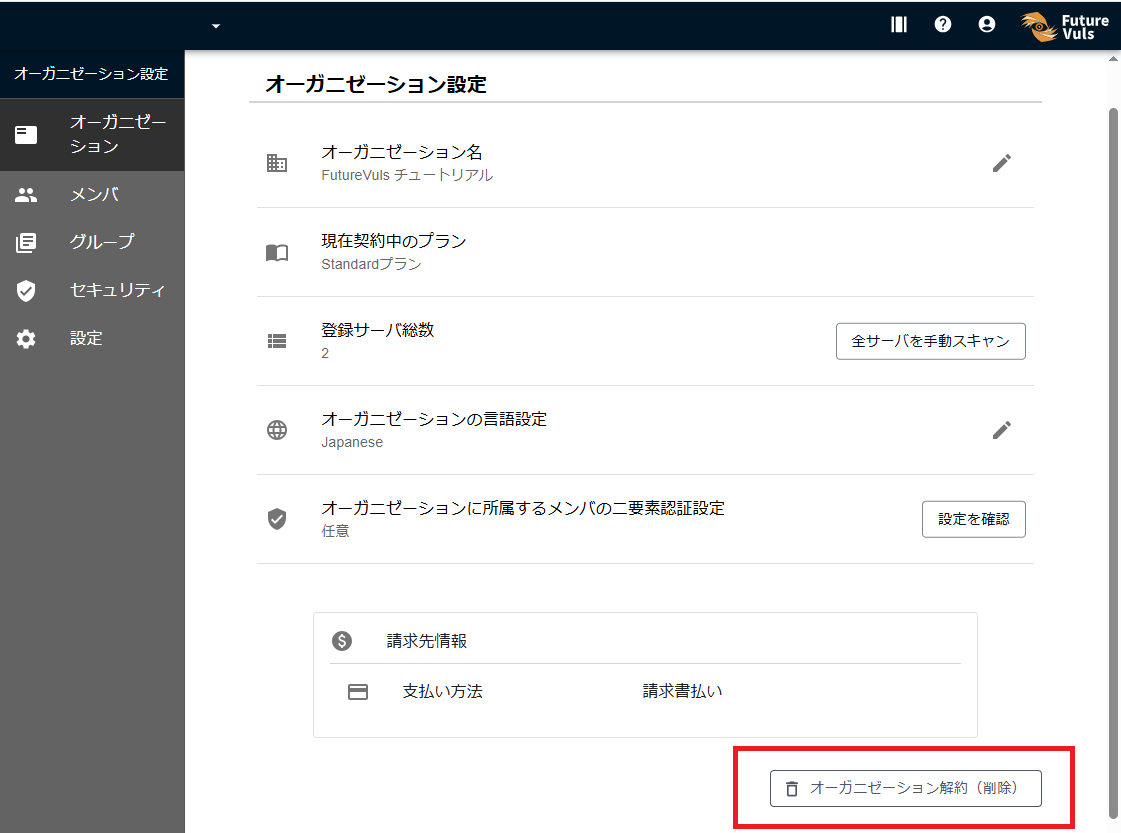
When you delete the organization, the following actions are performed automatically:
- Deletion Notification Email: A notification email will be sent to all users belonging to the organization.
- Automatic Deletion of Account Information: After the organization is deleted, the account information of all its users will be automatically deleted.
Individual users do not need to take any action to cancel their accounts
Since the account information of all users is automatically deleted after the organization is deleted, individual users do not need to cancel their accounts, nor does an administrator need to delete users manually.
Finally#
Thank you for using FutureVuls.
To help us improve, we would appreciate it if you could take a moment to fill out our survey.
We will continue to improve our service. We hope you will consider using FutureVuls again in the future.