CVE Details#
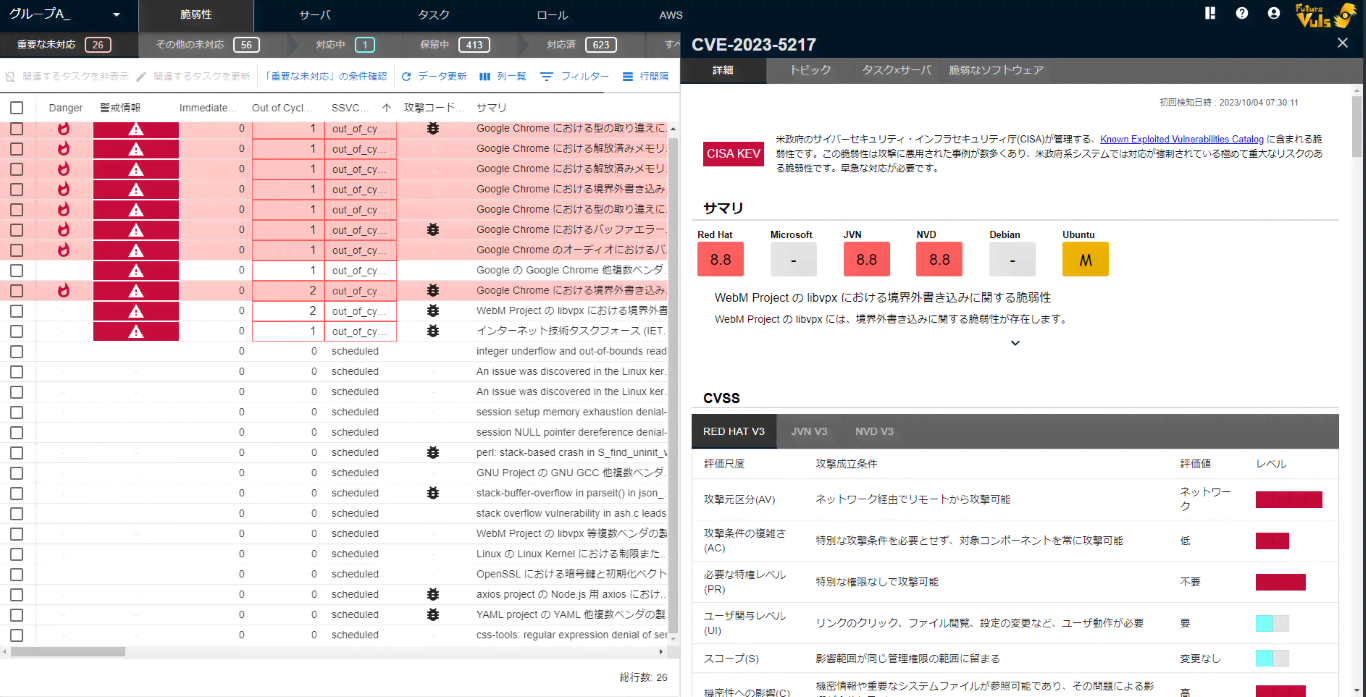
Click a vulnerability in the first pane to display its details in the second pane.
Description Tab#
The Description tab shows detailed information about the vulnerability.
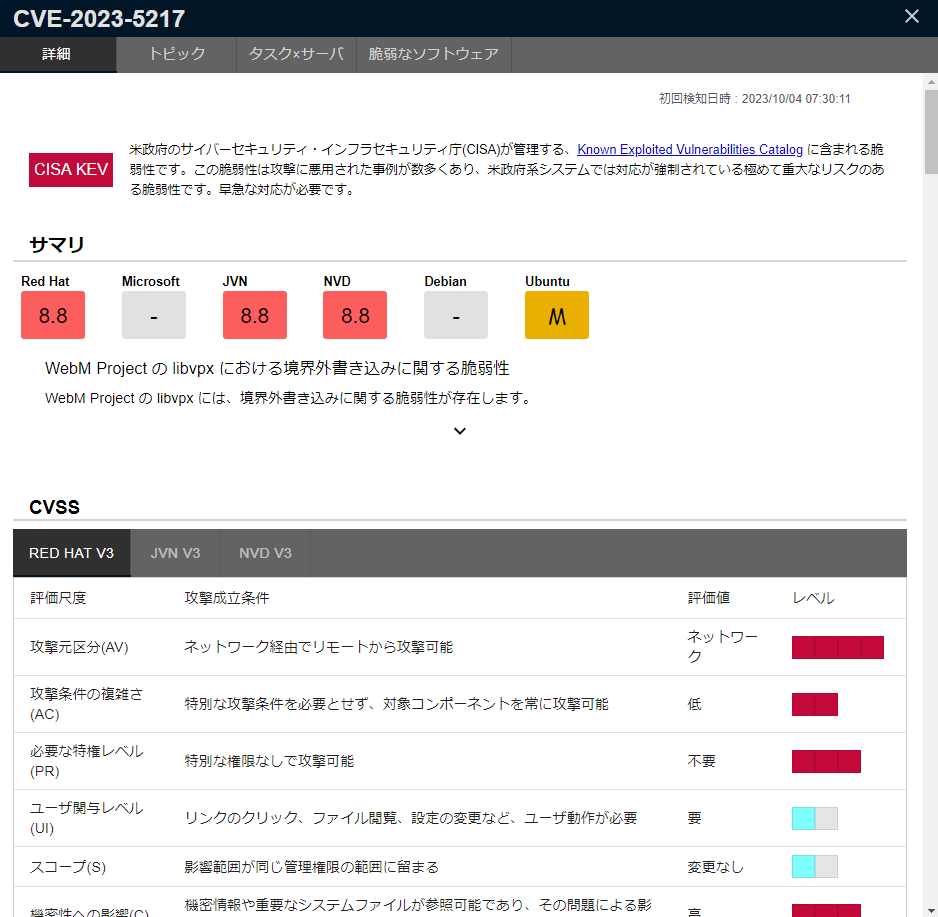
The following items are displayed in the vulnerability details.
| Item | Details |
|---|---|
| Summary | Displays the CVSS score from each source and the description from a representative source. The AI summary is also displayed at the bottom. |
| CVE Priority | Allows you to manually set the priority for individual vulnerabilities. However, priorities set by a Special Alert Tag cannot be overridden. |
| Threats & Exploitation | Displays four items, EPSS, Security Alert, Threat Info, and Exploit Code, as Threats & Exploitation. |
| CWE | Displays the CWE related to the vulnerability. |
| Mitigation | Displays links related to mitigating the vulnerability risk through configuration changes. |
| Linux Distribution Support Page | Displays the official vulnerability information page published by each distribution. |
| Primary Source | Displays the support page URL for each vendor. |
| Reference | Displays references related to the vulnerability. |
CVSS scores are now displayed in the "Summary" section of the CVE Details. Expand a CVSS vector to view its base metrics.
Threats & Exploitation#
"Threats & Exploitation" displays information about the threat level and exploitation status of the vulnerability.
If an AI summary of threat information is available, it is displayed above the cards.
| Card | Details |
|---|---|
| EPSS | Displays the EPSS score, percentile, and a link to "CVEdetails". |
| Security Alert | If security alerts from sources such as CISA KEV, VulnCheck KEV, ENISA KEV, JPCERT/CC-Alerts, or CISA-Alerts are found, a link is displayed. |
| Threat Info | Displays the Vulnrichment SSVC values (Exploitation, Automatable), and information from MSRC when Exploitability is Detected or More Likely. |
| Exploit Code | If exploit code is found, a link and description are displayed. |
EPSS#
EPSS consists of a Score and a Percentile. The meaning of each value is as follows:
| Item | Details |
|---|---|
| Score | Represents the probability that the vulnerability will be exploited in the next 30 days. A higher value indicates a higher probability of exploitation and a greater threat. |
| Percentile | Represents the percentage of vulnerabilities with an EPSS score lower than that of the given vulnerability. A higher value means the vulnerability has a higher threat level compared to others. |
For more information about EPSS concepts and score distribution, please refer to "Glossary".
Handling EPSS
EPSS is an indicator that quantifies the threat level of a vulnerability, and it does not represent the risk posed by the vulnerability. (This is similar to how the CVSS Base Score only represents the severity of a vulnerability, not the actual risk.)
Even if the EPSS score is high, the impact may not be severe, or it may not adversely affect your organization.
LLM Vulnerability Summary#
New Feature (from July 14, 2025)
LLM-generated (Large Language Model) vulnerability summaries are now available.
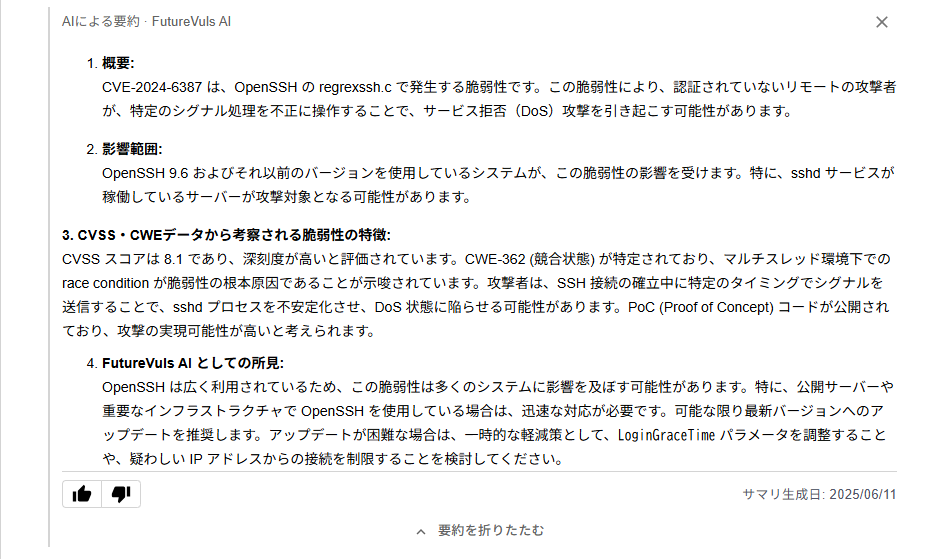
The vulnerability details screen displays an LLM-generated summary as "AI summary · FutureVuls AI". Two types of summaries are generated:
1. Vulnerability Summary#
The summary is created from data collected by FutureVuls, such as:
- Descriptions published by NVD and various vendors
- Values such as CVSS and CWE
The "Vulnerability Summary" is typically generated for all CVEs and is displayed in the "Summary". However, the Vulnerability Summary is not generated for CVEs for which NVD and vendors have not published a vulnerability description, such as rejected CVEs.
Vulnerability Summaries do not include information that changes daily, such as EPSS or exploitation status. Check "Threats & Exploitation" for the latest information. Changes to the scope and content of summaries do not apply to summaries created before the October 2026 release.
2. Threat Information Summary#
This summarizes known exploitation activity and countermeasures for a CVE.
The "Threat Information Summary" is created only for CVEs that have been confirmed to be actively exploited. Specifically, it covers CVEs where the SSVC "Exploitation" decision point is set to Active. The "Threat Information Summary" is displayed as "AI threat information summary · FutureVuls AI" in "Threats & Exploitation".

This feature makes it easier for non-security experts to understand the nature and severity of vulnerabilities.
The LLM summary is provided for reference purposes only. Please be sure to base your remediation decisions on primary sources and official vulnerability information.
Display Language#
Summaries are generated in both Japanese and English. English summaries are displayed in the following cases.
- Screen: when the display language is English (Browser Language Settings)
- FutureVuls API: when the organization's language setting is English
- Email notifications for Immediate task detection: when the recipient user views FutureVuls in English (Browser Language Settings)
- Slack App notifications for Immediate task detection: when the organization's language setting is English
Summaries that have not been translated yet are displayed in Japanese.
Summary Feedback Feature#
To improve the quality of LLM-generated summaries, users can rate each summary.
- Feedback buttons and the summary generation date are displayed at the bottom of the summary.
- Your feedback will be used to improve the quality of generated summaries in the future.
- Feedback is optional and can be skipped.
Topics#
In FutureVuls, you can create topics for each vulnerability to share investigation results and comments within your group and organization.
For more details, please see "Information Sharing and Alerts via Topics".
Tasks × Servers#
Tasks and servers related to the selected vulnerability are displayed.
Only Open or Ongoing tasks are displayed; resolved or hidden tasks are not shown.
High-risk Software#
A list of servers where the affected software is installed is displayed. For details on the list, please see "Software List".