Supply Chain Risk Tab#
The Supply Chain Risk feature allows you to check detected EOL and malicious packages and manage the details of each risk on this page. Clicking on an item in the list opens the Supply Chain Risk Details page, where you can view and update detailed information and the response status.
The following sections describe the items displayed in the list pane (the first pane).
Supply Chain Risk List#
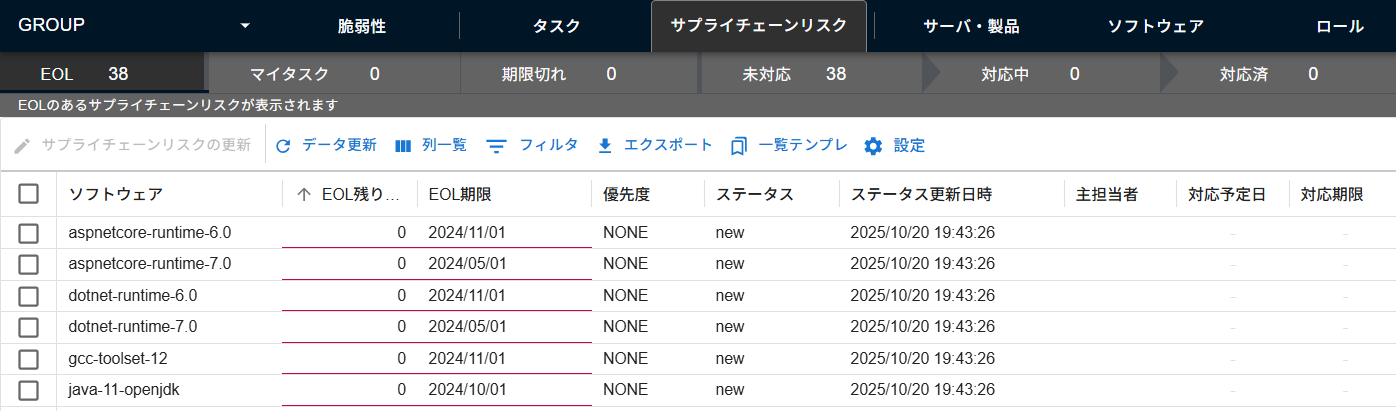
The Supply Chain Risk list shows all registered supply chain risks.
| Item | Details | Update Timing |
|---|---|---|
| Software / Server | Software name + version information (including server OS and libraries) | During a scan |
| EOL Remaining Days | The number of days remaining until the deadline. Blank if the type is not eol |
Updated in real-time based on the EOL date |
| EOL Deadline | The EOL standard support deadline, or if the software is under extended support, the EOL extended support deadline. Displays expired if support has ended and a specific EOL date is not publicly available.Blank if the type is not eol |
During a scan |
| Priority | The response priority set by the user. Defaults to NONE (set automatically upon creation) |
When priority is updated |
| Status | The status for response management. Automatically set statuses are NEW / CLOSED (users cannot manually set the status to CLOSED) |
During a scan / When status is updated |
| Last Status Update | The date and time the status was last updated | During a scan / When status is updated |
| Primary Assignee | The server assignee by default. The primary assignee set by the user |
When manually updated by a user. Resets to the server assignee upon reopening |
| Scheduled Date | The scheduled resolution date set by the user | When manually updated by a user. Cleared upon reopening |
| Due Date | The resolution deadline set by the user | When manually updated by a user. Cleared upon reopening |
| Server Name | The name of the server where the software is installed | When the server is updated |
| Role Name | The role to which the server belongs. If not set, it is assigned to the Default Server Role |
When the server is updated |
| Exposure | The Exposure of the SSVC Decision Point (the exposure level of the vulnerable component). The setting from the role associated with the server or the default setting for the group is applied |
When group settings or server roles are updated |
| Human Impact | The Human Impact of the SSVC Decision Point (the operational impact if attacked). The setting from the role associated with the server or the default setting for the group is applied |
When group settings or server roles are updated |
| Detection Method | The method used to detect the supply chain risk. Examples: endoflife.date, official OS vendor EOL information, FutureVuls proprietary logic (effective EOL), private EOL, osv (for malicious package detection), etc. |
During a scan |
| Last Supply Chain Risk Update | The date and time the supply chain risk was last updated | During a scan / When updated |
| Last Comment Update | The date and time the user last updated a comment | When a comment is updated |
| First Detection Time | The date and time the supply chain risk was first detected | During a scan |
| Last Priority Update | The date and time the priority was last updated | When priority is updated |
| Type | The type of supply chain risk, either eol or malicious |
During a scan |
Sub-tabs#

The Supply Chain Risk list has tabs for ease of use.
| Tab Name | Supply Chain Risks to be Retrieved |
|---|---|
| Malicious | A list of supply chain risks related to newly detected malicious packages |
| My Risk | A list of supply chain risks that are "not resolved" and for which "you are set as the primary assignee" |
| Expired | A list of supply chain risks that are "not resolved" and whose "resolution deadline is in the past" |
| Open | A list of supply chain risks with a "status of NEW" |
| Ongoing | A list of supply chain risks with a "status of INVESTIGATING or ONGOING" |
| Resolved | A list of supply chain risks with a "status of CLOSED, WORKAROUND, RISK_ACCEPTED, or NOT_AFFECTED" |
| All | A list of all supply chain risks |
About the discontinuation of the 'EOL' sub-tab
The previously existing "EOL" sub-tab has been integrated into the "All" sub-tab. Accessing the old URL will automatically redirect you to the "All" sub-tab.
Status#
The following statuses are available for supply chain risks that are unresolved or in progress.
| Status Name | State | Remarks |
|---|---|---|
| NEW | A new supply chain risk has been detected | Set when an EOL or malicious package is detected (including when a CLOSED supply chain risk is re-detected) |
| INVESTIGATING | Currently under investigation | Set when investigating a detected supply chain risk. Perform triage |
| NOT_AFFECTED | No impact | Confirmed that the supply chain risk does not affect the environment |
| ONGOING | In progress | Specific actions to reduce the risk, such as version upgrades, decommissioning, or migration, are being planned or executed |
The following statuses are available for supply chain risks that have been resolved.
| Status | Summary | Typical Countermeasures |
|---|---|---|
| CLOSED | Resolution complete | Actions like version upgrades or decommissioning are complete, and the supply chain risk has been permanently eliminated |
| WORKAROUND | Mitigation applied | Mitigation or monitoring measures have been implemented (a temporary solution) |
| RISK_ACCEPTED | Risk accepted | The risk has been evaluated and a decision has been made not to take action. This status is automatically assigned to software that is not being managed |
The status and general workflow for supply chain risks are illustrated below.
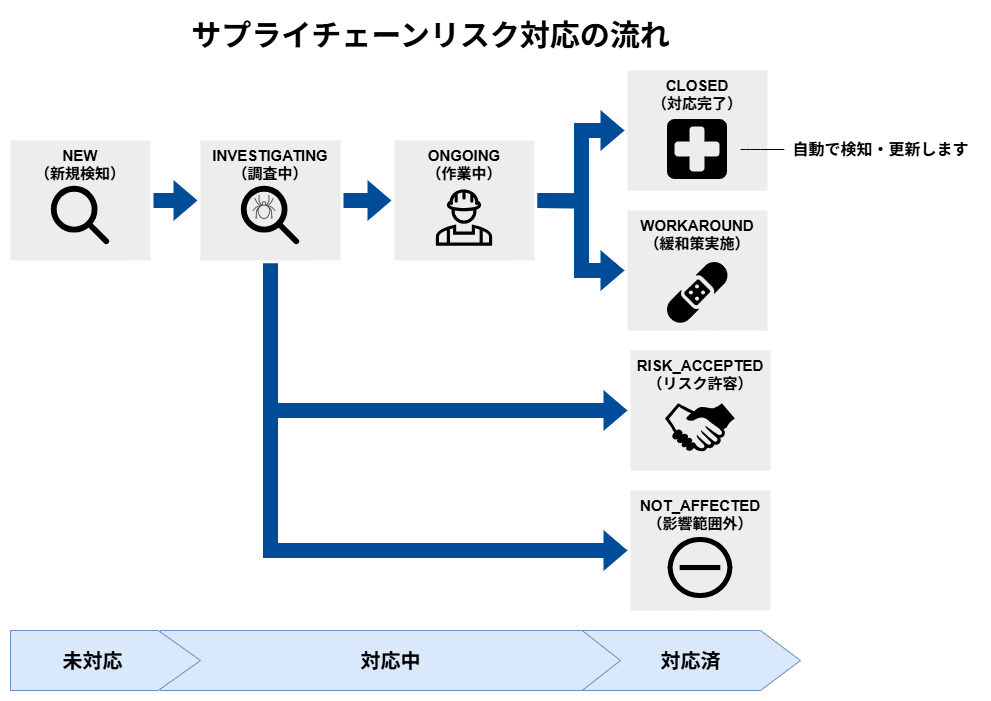
| Response Flow | Status Change Flow |
|---|---|
| After investigation, prepare and upgrade the version | NEW → INVESTIGATING → ONGOING (Upgrade preparation) → CLOSED |
| Implement a workaround and do not upgrade the version | NEW → INVESTIGATING → ONGOING → WORKAROUND |
| Investigation confirmed no environmental impact; no action required | NEW → INVESTIGATING → NOT_AFFECTED |
| After investigation and deliberation, the risk was accepted; no action will be taken | NEW → INVESTIGATING → RISK_ACCEPTED |
Q&A: Choosing the Right Status
- Q. Unable to upgrade the version, but communication has been blocked with a firewall. Which status should I use?
- A. Please select
WORKAROUND. Use this when the risk remains, but temporary mitigation measures have been implemented.
- A. Please select
- Q. Only used in a development environment and not exposed externally, so I have decided to accept the supply chain risk. Which status should I use?
- A. Please select
RISK_ACCEPTED. Use this when, after evaluating the risk, a business decision is made to "not take action." We recommend leaving a comment with the reason for the decision as an audit trail.
- A. Please select