Integrating into a CI/CD Pipeline#
By incorporating container image scanning and application dependency library scanning processes into your CI/CD pipeline, you can enable early detection of vulnerabilities and eliminate high-risk vulnerabilities before release.
Integrating Container Image Scanning into CI/CD#
This section explains how to scan container images and upload the results to FutureVuls within a CI/CD pipeline using GitHub Actions and AWS CodePipeline.
The following environment variables need to be defined:
| Variable | Description | Required |
|---|---|---|
| VULS_SAAS_GROUPID | The ID of the group to which the scan results will be uploaded. Please store this as an encrypted secret. | ✅ |
| VULS_SAAS_TOKEN | A FutureVuls token with scanning permissions. Please store this as an encrypted secret. | ✅ |
| DOCKERFILE_PATH | The path to the Dockerfile used to build the image. | ✅ |
| TARGET_IMAGE | The image to be scanned. Specify in the format <image_name>:<tag>. |
✅ |
| VULS_SAAS_UUID | The Server UUID in FutureVuls that uniquely identifies the target image. For new registrations, specify a value generated by a command like uuidgen.If you specify the server UUID of an already registered image, it will be treated as an update to that image. |
✅ |
- To update the configuration information of an image already managed on FutureVuls, specify the target image's UUID as
VULS_SAAS_UUID.
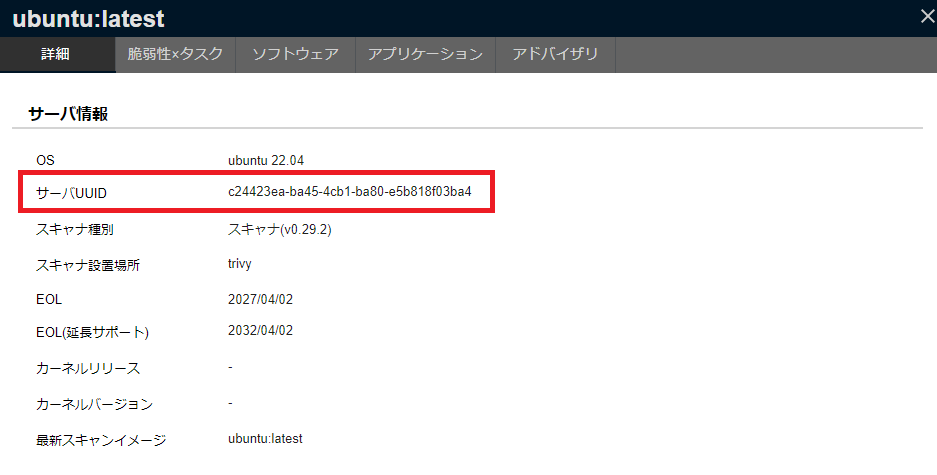
Environment Variable Configuration
It is recommended to set the following environment variables using encrypted secrets.
- VULS_SAAS_GROUPID
- VULS_SAAS_TOKEN
If these values are exposed, anyone could upload arbitrary scan results to the specified group in FutureVuls.
Integrating Container Image Scanning into a CI/CD Pipeline Using GitHub Actions#
This is an example of a GitHub Actions workflow that uses the Trivy integration script to perform a scan within a CI/CD pipeline.
name: FutureVuls Docker Image Scan
on:
  push
defaults:
  run:
      shell: bash
jobs:
  docker-test:
    name: FutureVuls Docker Image Scan
    env:
      VULS_SAAS_GROUPID: ${{ secrets.VULS_SAAS_GROUPID }}
      VULS_SAAS_TOKEN: ${{ secrets.VULS_SAAS_TOKEN }}
      DOCKERFILE_PATH: "docker/anything/Dockerfile"
      TARGET_IMAGE: "imageName:tag"
      VULS_SAAS_UUID: "xxxxxxxx"
    runs-on: ubuntu-latest
    steps:
    - uses: actions/checkout@v4
    - name: cached scan db
      uses: actions/cache@v3
      with:
        path: vulndb/
        key: trivy-vulndb
    - name: scan and upload
      env:
      run: |
        docker build . -f ${env.DOCKERFILE_PATH} -t ${env.TARGET_IMAGE}
        curl -s https://installer.vuls.biz/vuls-trivy-light.sh | \
        VULS_SAAS_GROUPID="${env.VULS_SAAS_GROUPID}" \
        VULS_SAAS_TOKEN="${env.VULS_SAAS_TOKEN}" \
        TARGET_IMAGE="${env.TARGET_IMAGE}" \
        VULS_SAAS_UUID="${env.VULS_SAAS_UUID}" \
        bash -s inst
Integrating Vulnerability Scanning into a CI/CD Pipeline Using AWS CodePipeline#
This is an example of a buildspec.yml file that uses the Trivy integration script to perform a scan within a CI/CD pipeline.
version: 0.2

#env:
#  variables:
    #VULS_SAAS_GROUPID: "define in secret manager"
    #VULS_SAAS_TOKEN: "define in secret manager"
    #DOCKERFILE_PATH: "./Dockerfile"
    #TARGET_IMAGE: "target_image:tag"
    #VULS_SAAS_UUID: "xxxx-FutureVuls-Server-UUID-xxxxxxxx"
phases:
  install:
    runtime-versions:
      python: latest
  build:
    commands:
      - 'docker build -t $TARGET_IMAGE .'
  post_build:
    commands:
      - 'curl -s https://installer.vuls.biz/vuls-trivy-light.sh | VULS_SAAS_GROUPID="$VULS_SAAS_GROUPID" VULS_SAAS_TOKEN=$VULS_SAAS_TOKEN TARGET_IMAGE=$TARGET_IMAGE VULS_SAAS_UUID=$VULS_SAAS_UUID bash -s inst'
      - "echo scan results Sent to Fvuls on `date`"
Integrating Application Library Scanning into CI/CD#
This section explains how to scan application dependency libraries and upload the results to FutureVuls within a CI/CD pipeline using GitHub Actions and AWS CodePipeline.
Scanning for Library Vulnerabilities on git push#
Upload the results of an application library scan to FutureVuls upon a git push. This section provides an example using GitHub Actions.
The sample GitHub Actions YAML file is as follows.
Environment Variables Used in the Example#
| Variable | Description | Required |
|---|---|---|
| VULS_SAAS_GROUPID | The ID of the group to which the scan results will be uploaded. | ✅ |
| VULS_SAAS_TOKEN | A token with scanning permissions. | ✅ |
| TARGET_LIBRARY | The path of the directory to be scanned. To scan the entire repository, you can leave this as ${{ github.workspace }}. |
✅ |
| VULS_SAAS_UUID | The UUID for management in FutureVuls. For new registrations, specify a value generated by a command like uuidgen. |
✅ |
| ACTIONS_RUNTIME_TOKEN | The GitHub token for authentication. Required if you encounter a RATELIMIT error. |
To update the configuration information of a library already managed on FutureVuls, specify the target library's UUID as VULS_SAAS_UUID.
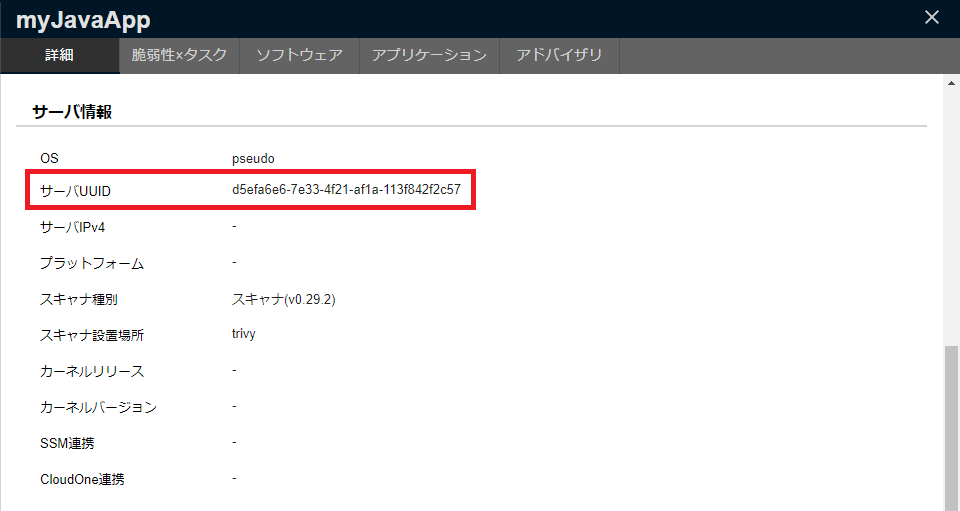
Environment Variable Configuration
It is recommended to set the following environment variables using encrypted secrets.
- VULS_SAAS_GROUPID
- VULS_SAAS_TOKEN
If these values are exposed, anyone could upload arbitrary scan results to the specified group in FutureVuls.
The scan is performed using the scanning script file.
name: FutureVuls library Scan
on:
  push:
defaults:
  run:
      shell: bash
jobs:
  docker-test:
    name: FutureVuls library Scan
    env:
      VULS_SAAS_GROUPID: ${{ secrets.VULS_SAAS_GROUPID }}
      VULS_SAAS_TOKEN: ${{ secrets.VULS_SAAS_TOKEN }}
      TARGET_LIBRARY: "${{ github.workspace }}"
      VULS_SAAS_UUID: "xxxx"
      ACTIONS_RUNTIME_TOKEN: ${{ secrets.GITHUB_TOKEN }}
    runs-on: ubuntu-latest
    steps:
    - uses: actions/checkout@v4
    - name: cached scan db
      uses: actions/cache@v3
      with:
        path: vulndb/
        key: trivy-vulndb
    - name: scan and upload
      run:
        curl -s https://installer.vuls.biz/vuls-trivy-light.sh | bash -s inst
How to Automatically Update a Lockfile on Push with GitHub Actions#
This section explains how to use futurevuls/fvuls-lockfile-uploader to update a lockfile registered in FutureVuls through the REST API only when the lockfile changes on git push. If a lockfile with the same path is already registered on the server, the action updates it; otherwise, it registers a new one.
The example below runs when a push to the release branch modifies go.mod or web/yarn.lock, and then uploads both lockfiles. Write the paths: patterns without a leading ./.
The following environment variables in the sample should be set as Encrypted Secrets. Pass them only in the env: of the steps that run this action so that other actions in the same job cannot read the token.
| Environment Variable Name | How to Confirm |
|---|---|
| FVULS_SERVER_UUID | Check from the Server List. |
| FVULS_TOKEN | Check from Group Settings > FutureVuls API. |
In with:, specify the path to the lockfile, relative to the repository root, in path and the string to prepend to the path registered in FutureVuls in repoName. The registered path depends on repoName as follows.
| repoName | path | Registered Path |
|---|---|---|
| (not specified) | ./go.mod |
go.mod |
owner/repo |
./web/yarn.lock |
owner/repo/web/yarn.lock |
on:
  push:
    ## https://docs.github.com/en/actions/learn-github-actions/workflow-syntax-for-github-actions#onpushpull_requestpaths
    paths:
      - 'go.mod'
      - 'web/yarn.lock'
    branches:
      - release

name: Check lockfiles

permissions:
  contents: read

jobs:
  build:
    name: Upload lockfile
    runs-on: ubuntu-26.04
    steps:
      - uses: actions/checkout@3d3c42e5aac5ba805825da76410c181273ba90b1 # v7.0.1
      - name: Upload go.mod
        uses: futurevuls/fvuls-lockfile-uploader@9245e71ad5a5833acf0196650027fc4a6be78921 # v2
        env:
          FVULS_SERVER_UUID: ${{ secrets.FVULS_SERVER_UUID }}
          FVULS_TOKEN: ${{ secrets.FVULS_TOKEN }}
        with:
          repoName: ${{ github.repository }}
          path: './go.mod'
      - name: Upload web/yarn.lock
        uses: futurevuls/fvuls-lockfile-uploader@9245e71ad5a5833acf0196650027fc4a6be78921 # v2
        env:
          FVULS_SERVER_UUID: ${{ secrets.FVULS_SERVER_UUID }}
          FVULS_TOKEN: ${{ secrets.FVULS_TOKEN }}
        with:
          repoName: ${{ github.repository }}
          path: './web/yarn.lock'