Supply Chain Risk Details#
The Supply Chain Risk feature allows you to view a list of detected EOLs and malicious packages and manage the details of each risk in the second pane.
When you click on an item in the Supply Chain Risk list (the first pane), detailed information is displayed in the second pane. Here, you can check EOL deadlines, malicious package information, and affected assets. You can also manage responses by setting statuses, priorities, and assignees, and share information with your team through comments.
The following sections describe each item displayed in the details pane (the second pane).
EOL Overview#
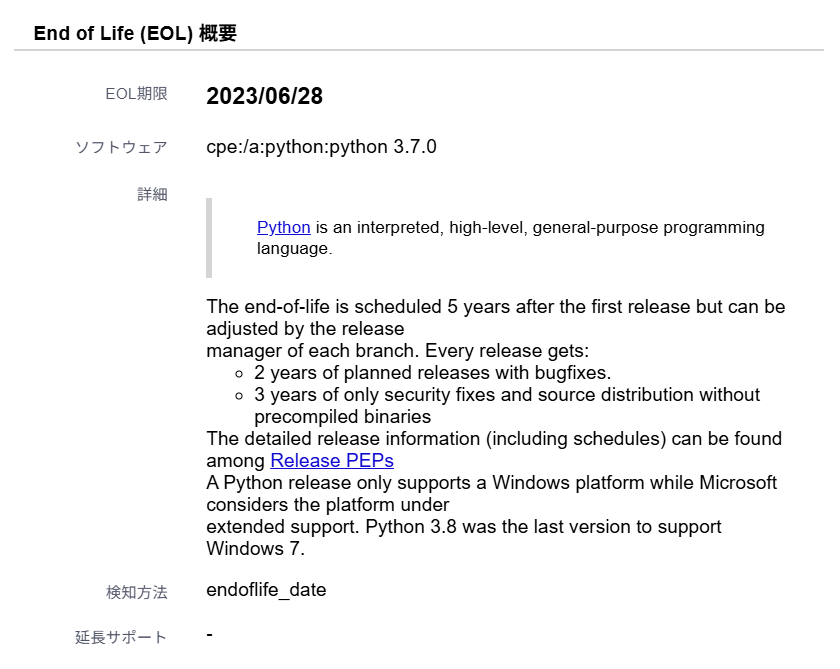
| Item | Details |
|---|---|
| EOL Deadline | If extended support is used, the EOL deadline for extended support is displayed. Otherwise, the EOL deadline for standard support is shown. If support has ended and a specific EOL date is not publicly available, Expired is displayed. |
| Software | Software name and version information (including server OS and libraries). |
| Detail | Detailed information about the EOL. (e.g., reason for EOL, post-EOL support information). For how reasons are shown for EOLs whose detection method is futurevuls and that have no Japanese reason, see "Organization Language Settings". |
| Detection Method | The method used to detect the EOL. ・ endoflife_date: EOL registered in vuls-saas/endoflife.date.・ futurevuls: FutureVuls' proprietary detection logic (effective EOL / EOL-Effective).・ os: Official EOL announcement from the OS vendor.・ rhel_application_stream_eol: RHEL Application Streams (see Detection Targets for details). |
| Extended Support | If extended support is provided, its expiration date. |
How to Switch to Extended Support
For products that offer extended support, you can configure whether you are using it on the following pages:
- For OS EOL: Server Details page
- For Software EOL: Software Details page
You can navigate to these pages from the links in the "Affected Assets" section below. When you turn on extended support, the EOL deadline will switch to the extended support deadline.
Malicious Package Overview#
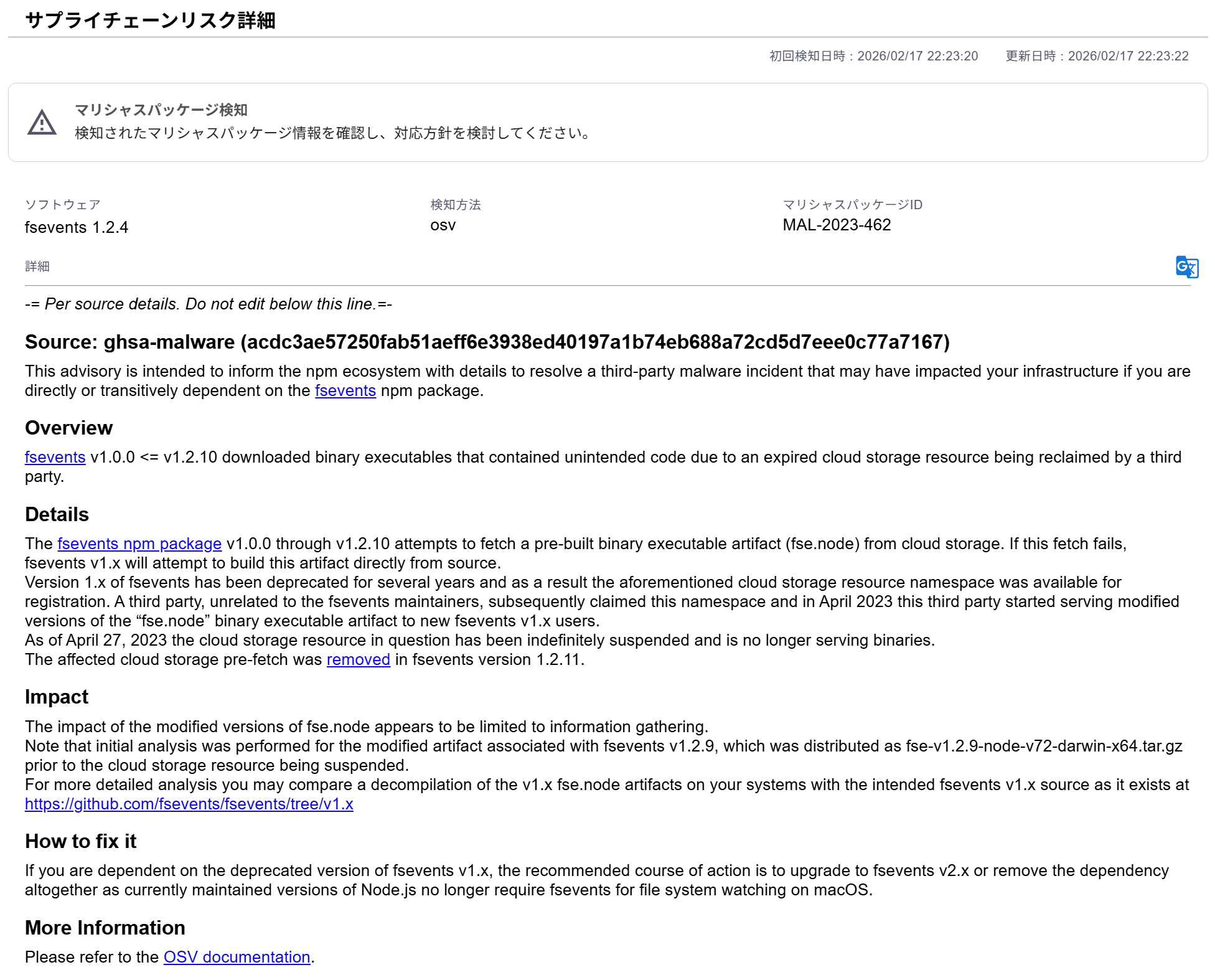
| Item | Details |
|---|---|
| Software | Software name and version information. |
| Detection Method | The method used to detect the malicious package. ・ osv: Detected by matching against malicious package information provided by OSV (Open Source Vulnerability). |
| Malicious Package ID | Identifier for the malicious package (MAL-xxx format). An ID assigned by OSV. |
| Detail | Detailed information about the malicious package (e.g., summary of malicious behavior). |
Affected Assets#
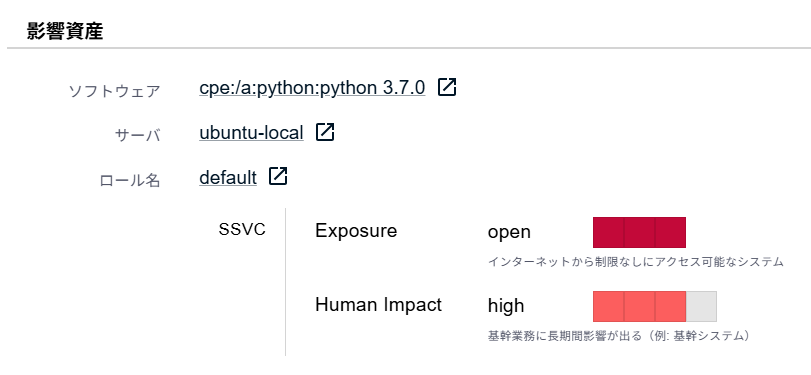
| Item | Details |
|---|---|
| Software | The software name and version information associated with the supply chain risk (including server OS and libraries). Clicking the software name opens the Software Details page. |
| Server Name | The name of the server where the supply chain risk was detected. |
| Role | The role to which the server belongs. If not set, it will be assigned to the Default Server Role. |
| SSVC Exposure | The Exposure of the SSVC Decision Point (the exposure level of the vulnerable component). The setting from the role associated with the server or the default setting for the group is applied. |
| SSVC Human Impact | The Human Impact of the SSVC Decision Point (the operational impact if attacked). The setting from the role associated with the server or the default setting for the group is applied. |
Utilizing SSVC Decision Points
In the Affected Assets section, you can check the SSVC Decision Points (Exposure, Human Impact) for each server where a supply chain risk has been detected. By evaluating this information alongside the supply chain risk details (such as the EOL deadline or the severity of the malicious package), you can better prioritize your response.
Action Management#
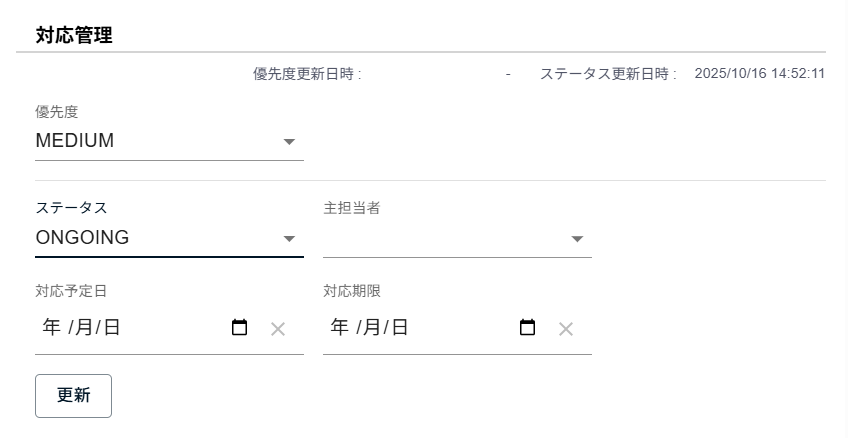
| Item | Details |
|---|---|
| Status | The Status in Action Management is displayed. The statuses NEW and CLOSED are set automatically.Users cannot manually set the status to CLOSED. |
| Priority | The priority in Action Management (* Not affected by the custom priority alias setting in Organization Settings > Priority Alias). |
| Primary Assignee | The primary assignee. The primary assignee set by the user is displayed. If a default assignee is set for the server, that default assignee will be set when the supply chain risk is created. |
| Scheduled Date | Displays the scheduled date set by the user. |
| Due Date | Displays the due date set by the user. |
| Comments | Posted comments are displayed. Can be written in Markdown format. |
Candidates for Main Assignee#
The users who can be designated as the primary assignee are as follows:
- Individuals with the following permissions (can be checked in
Group Settings > Member)- Owner
- CSIRT
- Groupset admin / member
- Group admin / member
Comments#
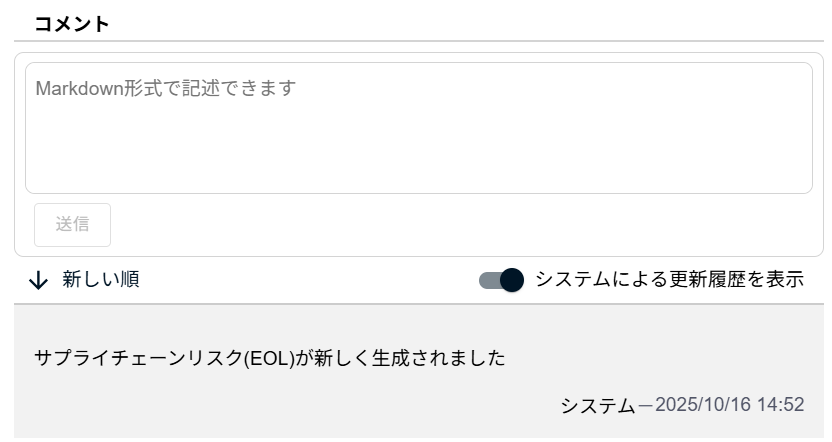
You can review the system's update history for the supply chain risk, or post comments to share information with other users.
You can toggle the display of the system's update history with the Show system-generated update history bar.
Comment Notifications via Mentions#
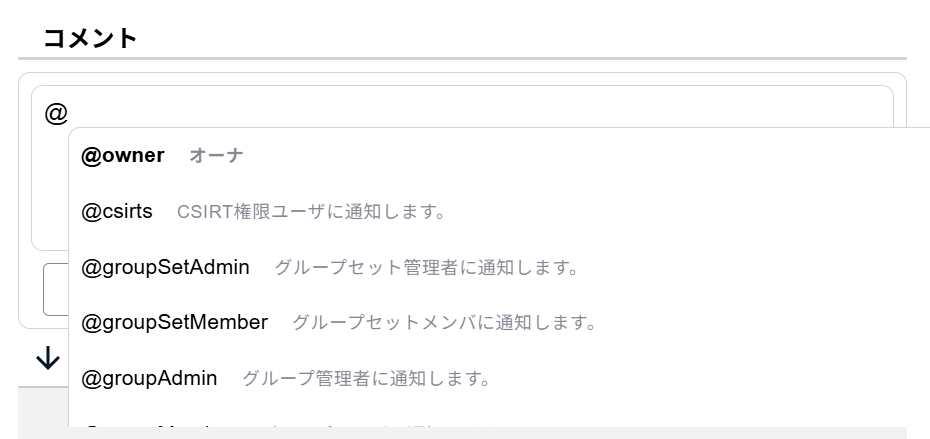
You can also use mentions in comments. By typing @ and selecting a target, an email notification will be sent to that user. You can select individual users and user groups as mention targets.
Mention Candidates#
The users and groups that can be specified in a mention vary depending on the screen you are viewing.
Group Screen#
| Target | Permissions/Content | Mention Example |
|---|---|---|
| Individual User | Owner, CSIRT, Groupset admin/member/read-only, Group admin/member/read-only (Can be checked in Group Settings > Member) |
@YamadaTaro |
| User Group | Owner | @owner |
| CSIRT | @csirts |
|
| Admin of the group set containing the affected group | @groupSetAdmin |
|
| Member of the group set containing the affected group | @groupSetMember |
|
| Admin of the group to which the supply chain risk belongs | @groupAdmin |
|
| Member of the group to which the supply chain risk belongs | @groupMember |
Group Set Screen#
| Target | Permissions/Content | Mention Example |
|---|---|---|
| Individual User | Owner, CSIRT, Groupset admin/member/read-only (Can be checked in Groupset Settings > Member) |
@YamadaTaro |
| User Group | Owner | @owner |
| CSIRT | @csirts |
|
| Admin of the group set containing the affected group | @groupSetAdmin |
|
| Member of the group set containing the affected group | @groupSetMember |
|
| Admin of the group to which the relevant supply chain risk belongs | @groupAdmin |
|
| Member of the group to which the relevant supply chain risk belongs | @groupMember |