Reliability#
The Reliability of a FutureVuls task indicates how reliably the vulnerability was detected.
In FutureVuls, reliability is determined based on the Confidence score assigned by OSS Vuls, as shown below.
flowchart TD
    A["OSS Vuls detects a vulnerability"] --> B["Assigns Confidence to<br>the Detection Method"]
    B --> C{"Check the Confidence value"}
    C -- "1 < Confidence ≤ 10" --> D["Reliability: Low ⚠️<br>(Potential for false positives)"]
C -- "10 < Confidence ≤ 100" --> E["Reliability: High ✓"]- During the OSS Vuls scanning process, a
Confidencevalue from 1 to 100 is assigned to eachDetection Method.- For details on each
Detection Method/Confidence, please refer to the OSS Vuls documentation.
- For details on each
- When detecting a vulnerability, OSS Vuls assigns a
Detection Methodto it. - In FutureVuls, the reliability is determined by the
Confidencevalue corresponding to the assignedDetection Method.- If
1 < Confidence <= 10: "Reliability: Low" - If
10 < Confidence <= 100: "Reliability: High"
- If
How Reliability is Displayed#
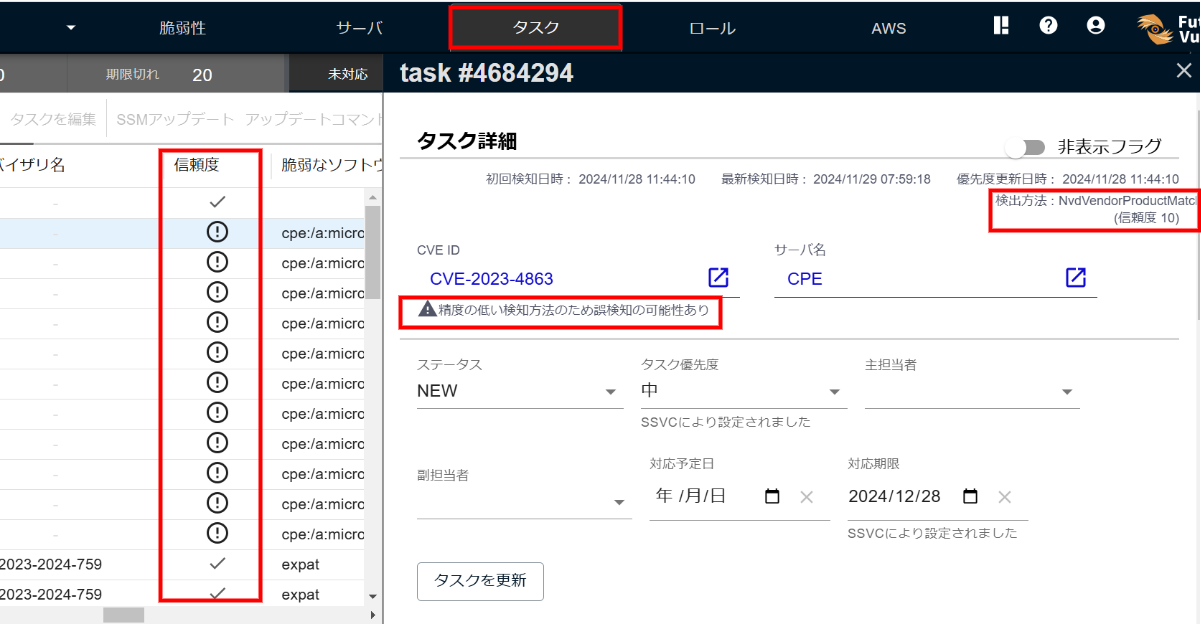
In the Reliability column of the Tasks tab, the reliability is indicated as follows:
- ✓: "Reliability: High"
- !: "Reliability: Low"
Additionally, the task details show the following:
- "CVE" tab: The note "Low-reliability detection method; false positives are possible" (only when the reliability is Low).
- "Related Software" tab: The detection method assigned by OSS Vuls to the vulnerability, along with its corresponding
Confidencevalue (in the format "Detection Method: detection method name (Reliability value)").
Specific Detection Methods Judged as High/Low Reliability#
Based on the OSS Vuls documentation, this section details the specific detection methods judged as Low Reliability and High Reliability.
Detection Methods Considered Low Reliability#
Examples of CPE scan detection methods considered Low Reliability include the following.
| Detection Method | Description |
|---|---|
| NvdVendorProductMatch | Used when the product matches NVD criteria but the version match cannot be confirmed, such as for a CPE registered without a version. |
| FortinetVendorProductMatch | Used when the product matches Fortinet criteria but the version match cannot be confirmed. |
| JvnVendorProductMatch | Used when a CPE-related vulnerability is not found in the NVD or Fortinet data sources and is detected only via JVN. The JVN detection process cannot perform version range comparisons, so all items matching the defined CPE's Part, Vendor, and Product are detected. For this reason, it is judged as Low Reliability. |
As of the October 2026 release, approximate matching with NvdRoughVersionMatch (Confidence: 80) has been discontinued. Product matches whose versions cannot be confirmed use the VendorProductMatch family (Confidence: 10).
Detection Methods Considered High Reliability#
- For scanning methods other than CPE scan:
- These are judged as "Reliability: High".
- For CPE scan:
- A match with a confirmed version uses the
ExactVersionMatchfamily (Confidence: 100) and is judged as "Reliability: High". - An example of a CPE scan detection method considered High Reliability is
NvdExactVersionMatch. It is assigned when the match against NVD detection criteria is confirmed down to the version. - When NVD detection criteria match the version of a CPE such as
cpe:2.3:a:microsoft:edge_chromium:118.0.2088.88:*:*:*:*:*:*:*(corresponding NVD page),NvdExactVersionMatchis assigned.
- A match with a confirmed version uses the
How to Handle Low-Confidence Vulnerabilities#
If the reliability is low, false positives are more likely. Therefore, we recommend verifying whether it is a false positive. To determine whether a low-reliability task is a false positive, verify the details using primary vulnerability sources, distribution support pages, and the links in the References section. If you confirm there is no impact, you can hide the task and change its status to "NOT_AFFECTED".