Stopping and Resuming the Scanner#
On the server where the scanner is installed, run the following.
Linux#
The Linux scanner is scheduled by the cron entry in /etc/cron.d/vuls-saas-scan on the server where it is installed.
Stopping the Linux Scanner#
You can stop the scanner by commenting out the trigger definition for vuls-saas-scan.
# Scanner is running

$ cat /etc/cron.d/vuls-saas-scan
15 16 * * * vuls-saas /opt/vuls-saas/vuls-saas.sh >/dev/null 2>&1
↓ Add a # to the beginning.
# Stop the scanner

$ cat /etc/cron.d/vuls-saas-scan
#15 16 * * * vuls-saas /opt/vuls-saas/vuls-saas.sh >/dev/null 2>&1
Resuming the Linux Scanner#
By removing the leading #, the scanner will resume operation.
# Scanner is stopped

$ cat /etc/cron.d/vuls-saas-scan
#15 16 * * * vuls-saas /opt/vuls-saas/vuls-saas.sh >/dev/null 2>&1
↓ Remove the leading #.
# Resume the scanner

$ cat /etc/cron.d/vuls-saas-scan
15 16 * * * vuls-saas /opt/vuls-saas/vuls-saas.sh >/dev/null 2>&1
Windows#
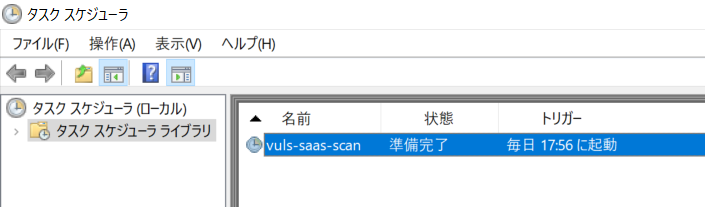
The Windows scanner is scheduled using Task Scheduler on the server where it is installed.
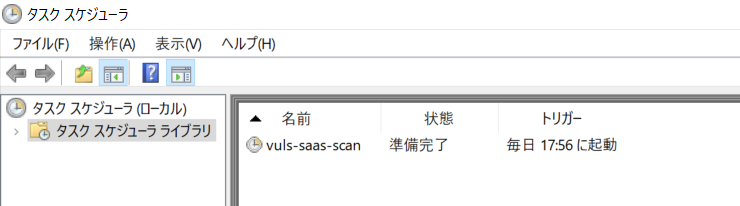
Stopping the Windows Scanner#
Right-click the vuls-saas-scan task and select "Disable" to stop the Windows scanner.
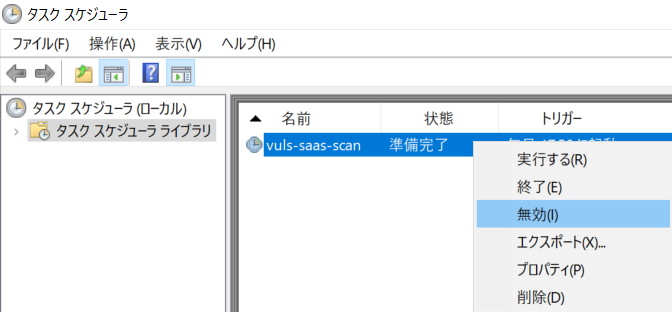
If the task status shows "Disabled", the scanner is stopped.
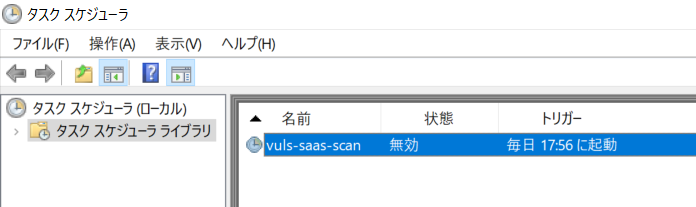
Resuming the Windows Scanner#
Right-click the disabled vuls-saas-scan task and select "Enable" to resume the Windows scanner.
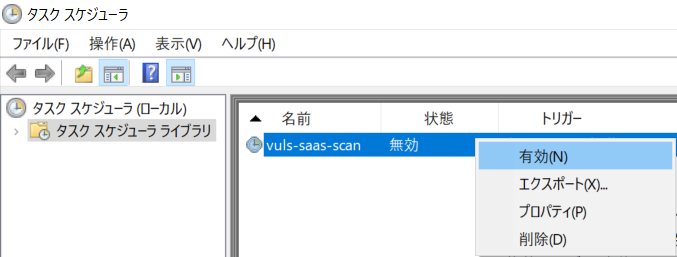
If the task status shows "Ready", the scanner will start at the next scheduled time.
Trivy#
The Trivy scanner is scheduled by the cron entry in /etc/cron.d/vuls-trivy-saas-scan on the server where it is installed.
Stopping the Trivy Scanner#
You can stop the scanner by commenting out the trigger definition for vuls-trivy-saas-scan.
# Scanner is running

$ cat vuls-trivy-saas-scan
59 06 * * * vuls-trivy-saas /opt/vuls-trivy-saas/vuls-trivy-saas.sh &> /opt/vuls-trivy-saas/vuls-trivy.log
↓ Add a # to the beginning.
# Stop the scanner

$ cat vuls-trivy-saas-scan
#59 06 * * * vuls-trivy-saas /opt/vuls-trivy-saas/vuls-trivy-saas.sh &> /opt/vuls-trivy-saas/vuls-trivy.log
Resuming the Trivy Scanner#
By removing the leading #, the Trivy scanner will resume operation.
# Scanner is stopped

$ cat vuls-trivy-saas-scan
#59 06 * * * vuls-trivy-saas /opt/vuls-trivy-saas/vuls-trivy-saas.sh &> /opt/vuls-trivy-saas/vuls-trivy.log
↓ Remove the leading #.
# Resume the scanner

$ cat vuls-trivy-saas-scan
59 06 * * * vuls-trivy-saas /opt/vuls-trivy-saas/vuls-trivy-saas.sh &> /opt/vuls-trivy-saas/vuls-trivy.log