Paste Scan#
Paste Scan is a scanning method for vulnerability management in environments where it is difficult to deploy scanners, such as the following:
- Isolated environments disconnected from the internet
- Environments where uploading to external SaaS is prohibited
- Environments where scanner programs cannot be installed on the server
Simply execute a few commands on the server to retrieve configuration information, and then copy and paste the command output on the FutureVuls screen to complete the registration.
For supported scan targets, see Linux, Windows, and Solaris.
Regarding Creating and Updating Paste Servers via FutureVuls API
Using the FutureVuls API, you can create and update paste servers via the REST API.
How to Register a Paste Scan#
This section explains the steps from registering configuration information to performing a vulnerability scan.
For Windows and Solaris
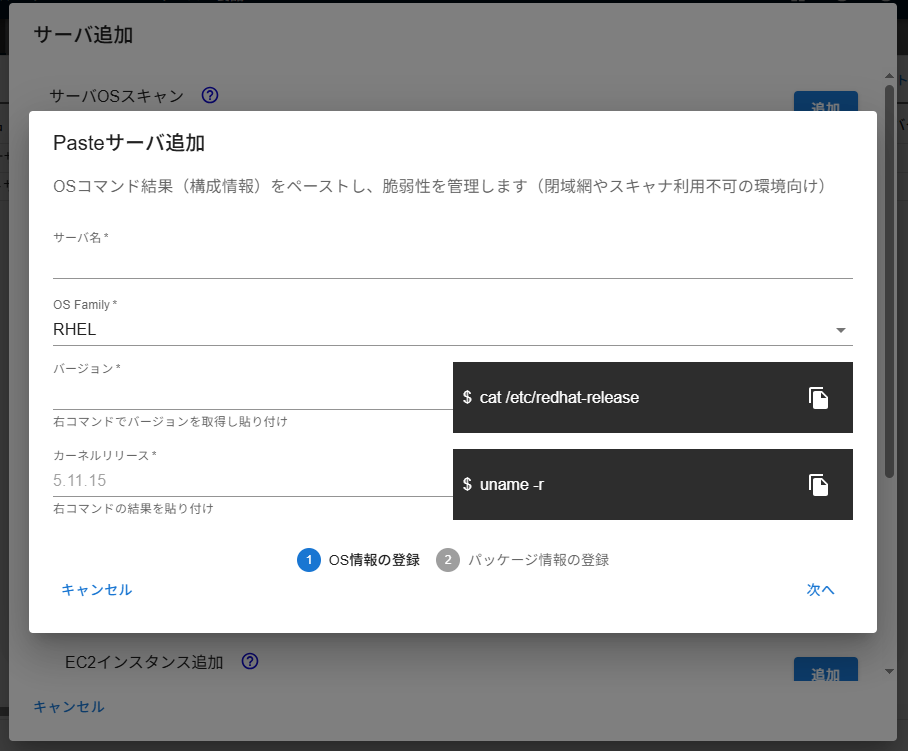
The following instructions are for servers with a Linux OS. The commands to be executed differ for each distribution. Regardless of version differences, you can obtain the necessary information by executing the commands displayed on the screen.
For Windows, some of the commands to be executed are different. Please refer to "Windows Paste Scan" for details. For Solaris, some of the information to be entered is different. Please refer to "Solaris Paste Scan" for details.
-
Server >
Add Server>Add Paste Server
-
Enter the server name and OS information (OS Family, Version, Kernel Release).
-
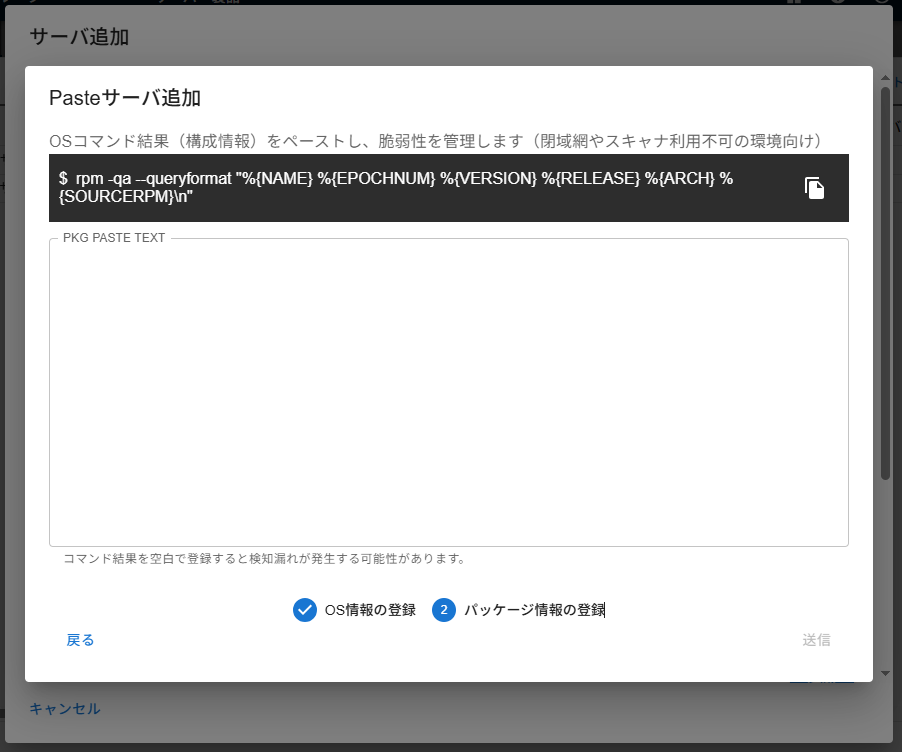
To obtain package information, execute the commands shown on screen on your server and paste the results.
-
Execute a manual scan from the screen.
After the manual scan is complete, vulnerabilities will be detected based on the registered package information.
Updating a Paste Server#
If the server's configuration information is updated, for example by updating packages on the actual server, you need to re-synchronize the configuration information for the server registered in FutureVuls as a paste server. Select the relevant server in the "Server" tab, and choose "Update Paste Server Configuration Information > Update Configuration Information".
The next time a scan is performed, the vulnerability detection process will run based on the updated configuration information.
Tasks that have been resolved by package updates will be automatically updated to the PATCH_APPLIED status.
If you want to apply the updates immediately, please use "Manual Scan".