How to Use the Standard Plan#
This document explains the basic concepts of vulnerability triage for users of the FutureVuls Standard Plan, along with the actual steps using the user interface. Note that the CSIRT plan includes an advanced automatic triage feature, which you should refer to if you are on that plan.
FutureVuls allows for flexible triage (selecting what to accept and prioritizing) of detected vulnerabilities.
- "Hide" vulnerabilities that can be accepted.
- Prioritize vulnerabilities that cannot be accepted.
Although acceptance criteria vary by organization, here we will use a relatively lenient triage example and assume the following vulnerabilities are acceptable:
- The attack vector is not from the network
- No patch is provided
- The attack requires privileges
Intended Users for This Tutorial
This tutorial assumes the following user environment. If your environment has advanced features, please follow your established policies.
- There are few staff members, and you want to select the most urgent issues first.
- You are assuming an internet-facing server, and for now, you will exclude attacks from a local context.
- Login and log audits are performed on the server, allowing malicious actions by internal logged-in users to be identified.
- Attacks combining network access with local privilege escalation can be mitigated by network access controls.
To prioritize a large number of vulnerabilities, we will proceed as follows.
| Step | Action | Implementation |
|---|---|---|
| 1 | Consider the risks to address | ・Clarify the criteria for judging what is "acceptable/unacceptable". ・For each vulnerability, consider whether it can be accepted. |
| 2 | Exclude accepted vulnerabilities | Hide them on the FutureVuls interface. |
| 3 | Respond to unacceptable vulnerabilities | Take action, such as performing updates. |
Consider the risks to address#
We will consider the "risks" arising from vulnerabilities. For each risk, we consider whether the following actions are possible. Items that do not fall into any of these categories will require a response.
| Action Category | Action Details | Specific Example | Caution |
|---|---|---|---|
| Mitigation | Reduce the likelihood or impact of occurrence. | Defend against malicious web access with a WAF. | This is only a mitigation, not a complete solution. |
| Avoidance | Eliminate the possibility of occurrence. | ・Stop/uninstall the relevant service. ・Migrate to another service. ・Implement updates. |
Often, it is difficult to choose an option other than updating. (e.g., migrating from BIND to PowerDNS) |
| Transference | Transfer the impact or responsibility to another entity. | Migrating from self-managed hardware to a SaaS provider to transfer hardware failure risk. | |
| Acceptance | Take no countermeasures and accept the impact. | ・Accept a local privilege escalation vulnerability assuming login access is not available. | The acceptable range is determined based on the operational context of the system, such as where the attack originates from (internet only, includes internal network, etc.), whether mitigation or avoidance is possible, and what impact might occur (e.g., service interruption due to DoS is acceptable, but data leakage or tampering is not). |
Exclude accepted vulnerabilities#
The following vulnerabilities can be considered acceptable:
| Countermeasure | Description |
|---|---|
| No update patch or workaround available | Since there is no way to address it at this time, either remove the package or reconsider when a fix becomes available. |
| Not attackable via the network | Vulnerabilities that manifest locally (e.g., privilege escalation, buffer overflows) can be mitigated by other measures (= risk is reduced). |
| Consideration of the impact | ・For systems where availability is not a high priority, vulnerabilities that cause DoS may be acceptable. ・Generally, Remote Code Execution (RCE) and similar threats should not be ignored. |
We will hide these on the FutureVuls screen.
Those without update patches and workarounds#
If you do not remove the corresponding package, you cannot address the vulnerability in this software at this time.
Therefore, configure FutureVuls to not display them until a patch or workaround is released.
- Filter by "Patch Availability: ×" and "Mitigation / Workaround: ×".
- Select all corresponding vulnerabilities and choose "Hide Related Tasks".
- Select "Hide until any change is made to the vulnerability information" and set to hide.
Those not attackable via the network#
In some cases, vulnerabilities that manifest locally (such as privilege escalation or buffer overflows) are mitigated by other measures (= risk is reduced). In such instances, you can choose to "accept vulnerabilities where the attack vector is local".
- Filter by "Network Exploitable: ×".
- Select all corresponding vulnerabilities and set to hide.
Among the acceptable vulnerabilities, those that "will not be directly addressed" are excluded (hidden) on the FutureVuls interface.
Hide acceptable vulnerabilities to exclude those that do not require a response. For those that can be avoided or mitigated, change the task to WORKAROUND after taking action.
Responding to unacceptable vulnerabilities#
For vulnerabilities that cannot be accepted, consider the response for each individually. It is important to prioritize them according to their urgency. Determine the priority for countermeasures based on multiple indicators, not just the CVSS score, and address them sequentially.
Determining Priority#
Determine the priority for countermeasures by referring to the following items:
Network Exploitable- No
Mitigation / Workaround Exploit CodeNo Privileges RequiredSecurity Alertinformation available
An Example of Prioritization Order
1. Security Alert information is published by organizations like JPCERT/CC when there is a high probability of attack or high impact. 2. "Network Exploitable" increases the likelihood of being attacked from the internet. 3. "Exploit Code" increases the likelihood of being attacked using the published code. 4. "No Mitigation / Workaround" and "No Privileges Required" affect the ease of attack.
As an example, determine the response in the following order of priority.
- Display in order of CVSS v3/v2 or Red Hat score.
Security Alertavailable,Exploit Codeavailable, noMitigation / Workaround.Security Alertavailable,Exploit Codeavailable.- For vulnerabilities where exploit code is already public and alerts have been issued by CISA, JPCERT/CC, etc., respond with the highest priority as an attack could begin at any moment (or may have already begun).
Network Exploitable,Exploit Codeavailable.Network Exploitable.
Once the priority is determined, consider its application.
Application Plan#
Decide whether the patch can be applied immediately or if verification is required.
- If verification is needed, a plan must be made to prepare a verification environment and conduct tests.
- If the priority is low, plan whether to address it along with higher-priority items or to apply it during a separate, periodic update.
Also, when updating, decide which version to update to. It is generally desirable to update to the latest version. This often resolves other vulnerabilities at the same time.
Furthermore, when future updates are released, they are often tested for compatibility with the immediately preceding version. Therefore, by keeping up-to-date, you can potentially skip some compatibility checks.
Caution#
While the above describes a general workflow, it may not be appropriate depending on your organization's policies or operational policies. The following responses should also be considered:
- Even if there are no patches or workarounds, caution is necessary if exploit code has been published.
- There are cases where exploit code exists, but there is no defensive measure.
- However, you may also find responses like "we confirmed it cannot be exploited, so the impact is considered low," or "we plan to address this issue in a future update." (This is often seen with RHEL, which uses backporting).
- If you have ample vulnerability handling resources, it is better to investigate this thoroughly. If not, it is also acceptable to temporarily accept the risk based on the vendor's judgment.
Recommended Tab Usage in FutureVuls#
To check for unaddressed vulnerabilities, use the Open view in the CVE tab.
This view shows items with the status NEW that are not hidden (= items that have not been addressed since detection).
Also, vulnerabilities that need to be judged on a per-server basis should be checked not in the "CVE" tab, but in the "Server / Product", "Role", or "Task" tabs.
Judgments such as "can be ignored for public servers, but not for internal servers" may be necessary.
In such cases, go to the Server / Product tab, Role tab, or Task tab, specify the target CVE-ID, and set hide settings or change the status for each server.
Actual Screen Operations#
Hiding Acceptable Vulnerabilities#
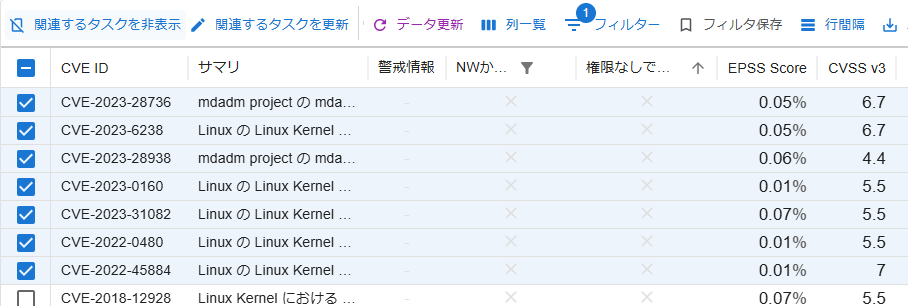
Hide vulnerabilities where the attack vector is other than "Network".
In this section, to demonstrate the screen operation, we are hiding vulnerabilities with an attack vector "other than Network". However, please be aware that not all vulnerabilities with an attack vector "other than Network" are low risk.
- Filter by "Network Exploitable: ×" under "CVE".
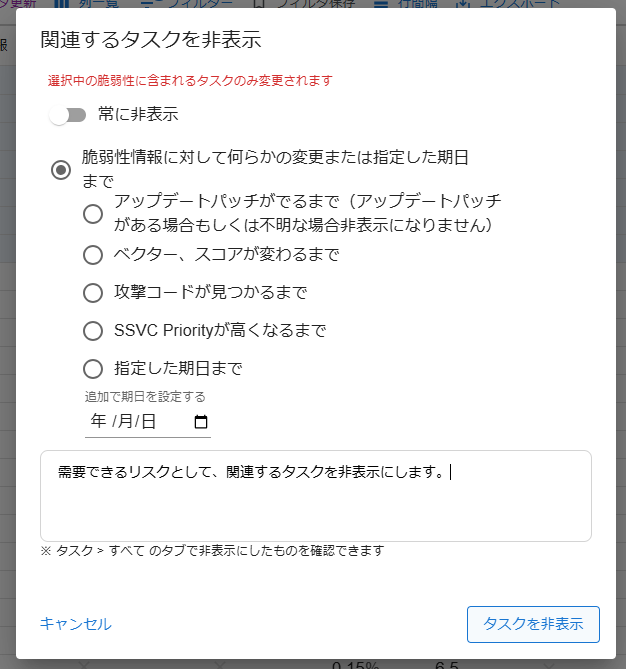
- Check the corresponding vulnerabilities and select "Hide Related Tasks".
- Select "Hide until any change is made to the vulnerability information" and submit.
Similarly, hide those for which no patch is provided.
Depending on your organization's policy, you may also filter by "Security Alert: ○", "Exploit Code: ○", "Mitigation / Workaround: ☓", "No Privileges Required: ○", etc.
By hiding acceptable risks on the screen, only the vulnerabilities that must be addressed will be displayed.
With the "CSIRT Plan" and its "Automatic Ignore feature", you can pre-define rules for accepting risks and automatically hide tasks. By combining this with server tags, you can define rules flexibly.
For example, you can automatically hide vulnerabilities considered low risk, such as:
- On servers tagged as "internal system"
- Not attackable from the network
Responding to Unacceptable Vulnerabilities#
After "Hiding Acceptable Vulnerabilities" as described above, only the vulnerabilities that require a response will remain. Prioritize and respond to the remaining vulnerabilities.
Prioritization is generally based on the CVSS v3 BaseScore. If v3 information is not available, refer to the v2 score. For Red Hat Enterprise Linux, the Red Hat score should take priority (due to considerations like backporting).
Starting with the highest scores, make judgments while looking at other indicators. For example, for a group with a score of 9.5 or higher, if the items "Security Alert / Exploit Code / No Mitigation / Workaround / No Privileges Required" are active, prioritize your response.
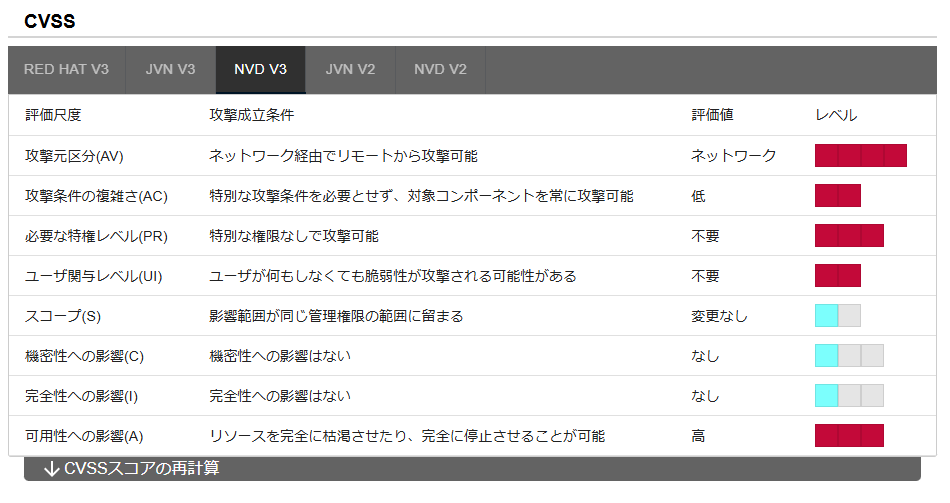
By opening the vulnerability details, you can understand the potential impact from the summary and the CVSS vector. For example, you can make judgments such as "prioritize responding to remote code execution" or "if it only affects availability, lower the priority slightly."
Based on the information above, set priorities and respond accordingly.
Rearranging Screen Columns
The columns can be rearranged, so for an environment with only RHEL servers, for example, it would be good to set the columns in the following order:
- Red Hat (Score provided by Red Hat)
- CVSS v3/v2 Score
- Summary
- Exploit Code
- Security Alert
- Network Exploitable
- No Privileges Required
Responding with Workarounds#
Check the box to the left of the target task and click "Update Related Tasks".
If you are about to start the response, set the "Task Status" to ONGOING and contact the person in charge.
After completing the response with a workaround, change the task status to WORKAROUND.
Tasks in the WORKAROUND state will no longer appear in "Open" and will be displayed in "Resolved".
Responding with Patch Application, etc#
If you are about to start the response, use "Update Related Tasks" to set the "Task Status" to ONGOING.
If you are responding by applying a patch, you do not need to change the status upon completion.
After the response is complete, the next scan will automatically change the task status to PATCH_APPLIED, and it will disappear from the vulnerability list.
Also, when responding to vulnerabilities, please use FutureVuls' features that support patch application.
- For tasks with a patch provided, clicking the "Update Commands" button will display the update command to be issued on the selected server (Manual).
- By selecting a task in the "Task" tab and clicking the "Ansible Playbook" button, you can download an Ansible Playbook (Manual).
- If you configure AWS integration, you can actually update packages on FutureVuls. Select the target tasks for update in the "Task" tab and click the "SSM Update" button (Manual).
Confirmation After Completion#
After completing the response to a vulnerability, confirm that the said vulnerability is no longer displayed in the vulnerability list.
- It will be hidden when the task status becomes
WORKAROUNDorPATCH_APPLIED. - Vulnerabilities for which the risk has been accepted should also be hidden.
- From now on, you will need to periodically process unaddressed vulnerabilities in the same way.
Sharing Information and Alerting Other Operators within the Organization#
Using the "Topic feature", you can share information with operators in other groups within the same organization. Since information sharing per CVE-ID can be done within an organization or group, information is consolidated and accumulated in one place, compared to sharing via Slack or email.
- This group has completed the update.
- We tried to update, but an API incompatibility issue occurred during testing.
- Be aware that attacks are rampant on the internet.
Let's share useful information within the organization.