Reading Reachability Analysis Results#
The results of reachability analysis appear in the "Reachability" column of the task list and on the "Reachability" tab of Task Details. You can also get them from the CSV report (see "CSV Report") and the FutureVuls API.
For an overview of this feature and important notes, see "Reachability Analysis (Beta)".
Reachability States#
| Display | Meaning |
|---|---|
| Reachable | A call path from the application's code to a vulnerable function was found |
| Partial | The analysis lost the path (for example, at reflection), so no verdict is possible. The vulnerable function can still be reachable |
| Not reachable | Within the analyzed scope, no path reaches a vulnerable function |
| Not analyzed | Shown in the rows of Task Details. The latest analysis results of the application have no row for this vulnerability |
| Not set up | Shown in the rows of Task Details. Reachability analysis is not set up for the application (no analysis results have ever been uploaded) |
| No verdict | The option in the task list filter that selects tasks without a reachability value (shown as - in the list) |
\"Not analyzed\", \"Not set up\", and \"No verdict\" do not mean safe
These show that no analysis result is available for the verdict. They do not mean that the vulnerable function is unreachable, or that the task is safe.
How the Task State Is Determined#
One task (server × vulnerability) can involve multiple applications. The state of a task is determined in the following order from the analysis results of all applications and packages involved in the detection of the task.
- If there is at least one Reachable, the state is Reachable
- If there is at least one Partial, the state is Partial
- If all involved applications and packages have been analyzed and all of them are Not reachable, the state is Not reachable
- Otherwise, the task has no value (
-in the task list)
A task that involves even one application without reachability analysis set up never becomes Not reachable.
An analysis result is used only while the package version at the time of the analysis matches the version that FutureVuls currently detects. After you upgrade a dependency library, the task can have no value until the next upload of analysis results.
The Reachability Tab in Task Details#
The "Reachability" tab appears right after the "Related Software" tab. This tab is displayed only for organizations on the CSIRT Plan, and only when the detections of the task include libraries of applications.
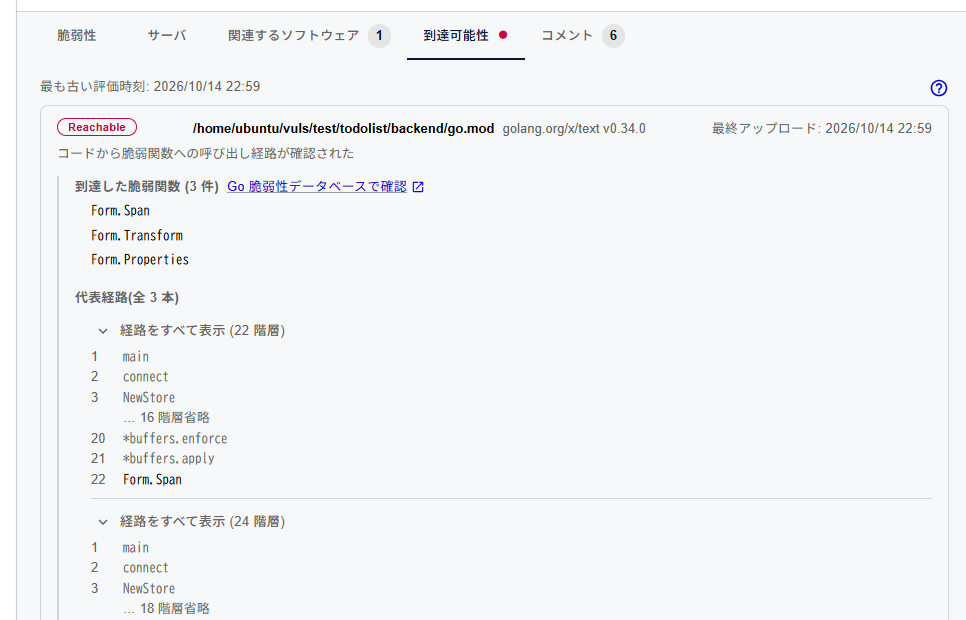
Next to the tab name, a mark shows the state of the task.
| Mark | Task state |
|---|---|
| Red ● | Reachable |
| Gray ● | Partial |
| Gray ◌ | Not reachable |
| None | No value |
At the top of the tab, "Oldest evaluation time" is displayed. This is the evaluation time of the oldest analysis result that the task state is based on. You can open the "Reachability Analysis (Beta)" page from the help icon at the top right.
The tab shows one row for each combination of application and package involved in the detection of the task, with the following items.
| Item | Details |
|---|---|
| State | One of Reachable, Partial, Not reachable, Not analyzed, and Not set up |
| Application | The registered name of the application. For SBOM applications, the name without the SBOM UUID |
| Package | The name and version of the package affected by the vulnerability |
| Last upload | The date and time when the analysis results of the application were last uploaded |
| Description | The description of the state |
| Reached vulnerable functions | The list and number of vulnerable functions for which a call path was found |
| View in Go Vulnerability Database | A link to the corresponding page of the Go vulnerability database (pkg.go.dev/vuln). It is displayed on rows with reached vulnerable functions when the Go vulnerability database ID that corresponds to the vulnerability is known. If there are multiple IDs, a link is shown for each ID |
| Sample call paths | Call paths from the application's code to the vulnerable function. Up to 3 paths are shown, and the heading shows the total number of paths |
The sample call paths are a subset of the paths. Vulnerable functions that are not in the sample call paths also have call paths.
The Reachability Column in the Task List#
The "Reachability" column is available for organizations on the CSIRT Plan. It is hidden by default, so display the "Reachability" column from "Columns" (see "Showing and Hiding Columns").
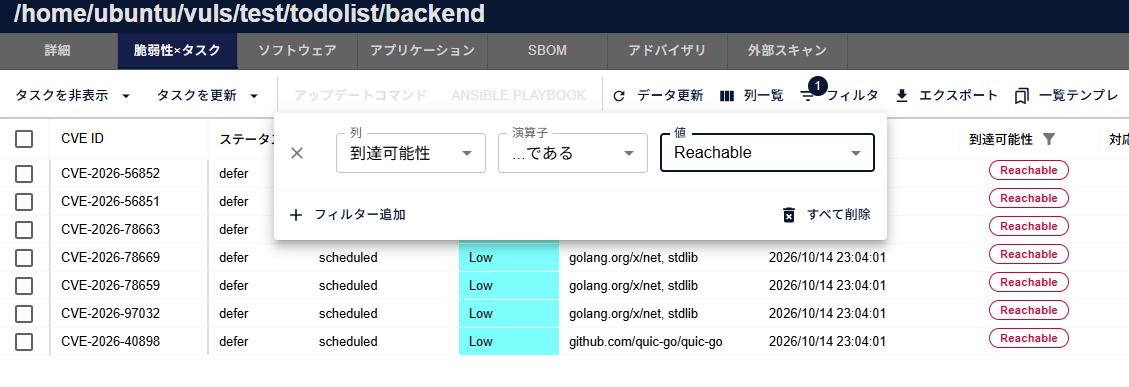
You can display this column in the following task lists:
- The task list of a group
- The task list of a group set
- The task lists in the server details and the CVE details (for groups and group sets)
| Operation | Details |
|---|---|
| Display | One of Reachable, Partial, and Not reachable. Tasks without a value show - |
| Filter | Select Reachable, Partial, Not reachable, or No verdict with "is". No verdict represents tasks without a value |
| Sort | Not available |
Task Comments#
When the reachability state of a task changes, a system comment is added on the "Comment" tab of the task. The language of the comment follows the language setting of the organization.
Reachability was changed from unanalyzed to reachable
- The states are shown as
reachable,partial, andnot_reachable. The state without a value is shown asunanalyzed - If the state changes multiple times in a short period, only the last change may be recorded
- If only the oldest evaluation time changes, no comment is added
- No notification is sent for this comment
- It is not reflected in "Last Comment" and other columns of the task list
When the Results Are Reflected#
| Where | When reflected |
|---|---|
| The "Reachability" tab of Task Details, the task details of the FutureVuls API | Immediately after the analysis results are uploaded |
| The task list, the CSV report, the task list of the FutureVuls API, task comments | It takes some time after the upload |
Changes in detections caused by scans or SBOM updates are reflected in the same way. Until they are reflected, the task list and Task Details may show different results.
Using the Results#
Reachability is reference information for making decisions together with SSVC and the task priority.
- Treat Partial as possibly reachable
- Do not close a task or lower its priority only because it is Not reachable. Not reachable only shows that no path was found within the analyzed scope
- Do not consider tasks without a value (Not analyzed, Not set up, No verdict) as unreachable