C/C++ Library Identification#
Overview#
Continuously managing vulnerabilities requires configuration management that accurately records the software in use and its versions. However, C/C++ projects often copy dependency library source code directly into the project instead of using a package manager. Standard configuration management and vulnerability identification are difficult in this situation.
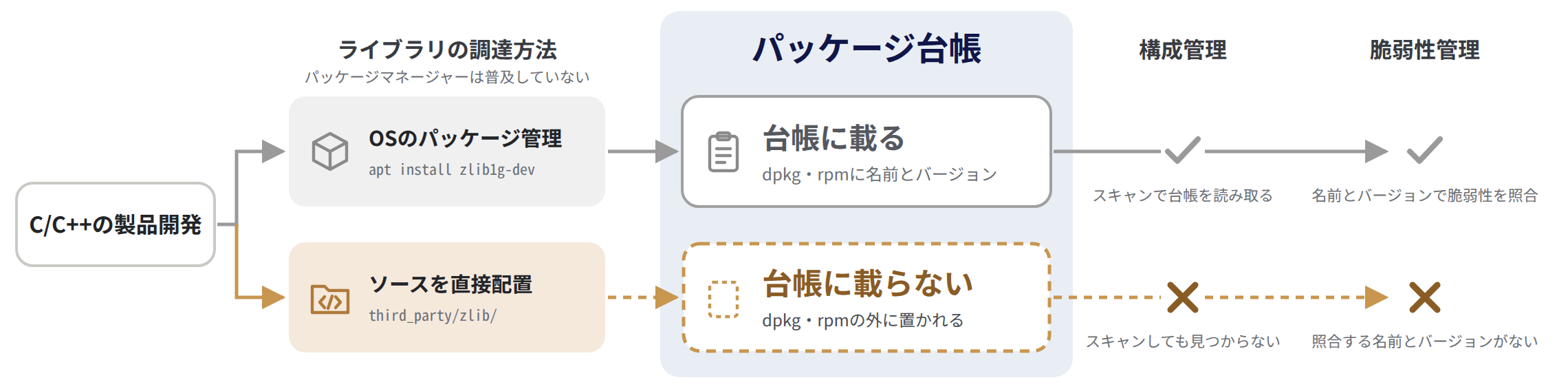
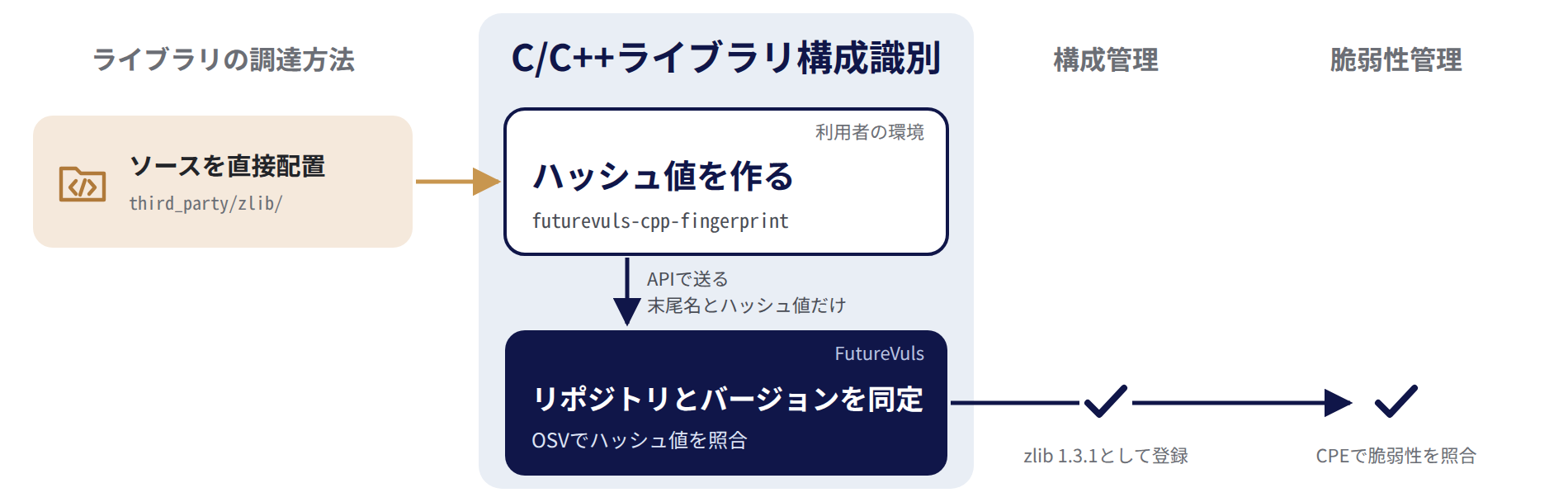
FutureVuls provides C/C++ Library Identification for this use case. The feature generates hashes from copied C/C++ library source code and automatically identifies and manages each library's repository and version in FutureVuls. It supports widely used libraries often bundled with products, including zlib, libxml2, and expat.
Background: Why C/C++ library configuration management is complex
For the background on why configuration management of C/C++ libraries is complex, see the FutureVuls Blog article Why is configuration management of C/C++ libraries difficult? (in Japanese).
Supported Environments#
The binaries are statically linked and require no additional dependencies.
| OS / architecture |
|---|
linux/amd64 |
linux/arm64 |
windows/amd64 |
Identification Targets#
This section describes the file types this feature analyzes, the supported libraries, and the data sent to FutureVuls.
Target Files#
The feature targets files with the following extensions in the specified directories.
.c,.cc,.cpp,.h,.hh,.hpp(lowercase extensions only;.Cand.Hare not targeted)
The feature also targets subdirectories. However, it does not target directories whose names start with . (such as .git) or symbolic links.
Files with CRLF line endings cannot be identified
The feature hashes file contents as is, without converting line endings.
The hashes used for matching are generated from sources with LF line endings, so files converted to CRLF do not match.
If the sources include files with CRLF line endings, such as sources obtained on Windows with Git's core.autocrlf enabled, futurevuls-cpp-fingerprint displays a warning.
Specify sources whose line endings remain LF.
Supported Libraries#
FutureVuls currently supports C/C++ open-source projects managed in Google/OSS-Fuzz (project list). FutureVuls identifies repositories and versions by querying OSV (Open Source Vulnerabilities), an external service, with the hashes it receives.
Data Sent to FutureVuls#
- Data sent to FutureVuls: The final name of each specified directory (used as the component name) and the MD5 hash of each file
- Data not sent: Source code, file names, and absolute or relative paths
FutureVuls queries OSV with only the hashes.
Usage Examples#
Use the following process to identify copied library source code.
- Generate library identification data: Run
futurevuls-cpp-fingerprintand generatefuturevuls-cpp-library.json, which records source-code hashes. - Send data to FutureVuls: Send the generated JSON file to the FutureVuls API from a local environment or CI/CD pipeline.
- Automatic identification: FutureVuls checks the hashes and identifies each library's repository and version.
- Review results: Review identification results in the console or through the FutureVuls API.
For the first upload, use the Add Lockfile API (POST /v1/lockfile). To update a registered futurevuls-cpp-library.json, use the Update Lockfile API (PUT /v1/lockfile/{lockfileID}).
See How to get lockfileID to find the lockfileID.
The following examples show the first upload (POST).
Prerequisites#
Enable Automatic CPE Assignment in Group Settings. FutureVuls assigns CPEs to identified libraries through Automatic CPE Assignment during scans. When it is disabled, FutureVuls does not assign CPEs and cannot detect vulnerabilities in these libraries. For details, see Automatic CPE Assignment.
Create a group token whose API permission includes Update before sending data through the API.
Set this token in FVULS_TOKEN.
SERVER_ID: How to get serverIDFVULS_TOKEN: FutureVuls API Token ManagementFVULS_SERVER_UUID: How to get UUID (CI/CD integration only)
The following examples stop if downloading the installer script or generating identification data fails, so that an old JSON file is not uploaded.
Linux#
set -euo pipefail

# Use the installer script to hash the sources in the specified directories and generate futurevuls-cpp-library.json
curl -fsSL -o futurevuls-cpp-fingerprint.sh https://installer.vuls.biz/futurevuls-cpp-fingerprint.sh
bash futurevuls-cpp-fingerprint.sh <library-directories> # Specify one or more directories of libraries to identify
# Example: bash futurevuls-cpp-fingerprint.sh third_party/*/
# Example: bash futurevuls-cpp-fingerprint.sh third_party/zlib third_party/libxml2

# Encode the generated file as Base64 to build the request body, then POST it
# (Write the body to a file and send it, because a large file does not fit in the command arguments)
SERVER_ID=<server-id> # Specify SERVER_ID from the prerequisites
FVULS_TOKEN=<api-token> # Specify FVULS_TOKEN from the prerequisites

{
  printf '{"serverID":%s,"path":"futurevuls-cpp-library.json","fileContent":"' "${SERVER_ID}"
  base64 -w 0 futurevuls-cpp-library.json
  printf '"}'
} > futurevuls-cpp-request.json

curl -fsS -X POST 'https://rest.vuls.biz/v1/lockfile' \
  -H 'Content-Type: application/json' \
  -H "Authorization: ${FVULS_TOKEN}" \
  --data-binary @futurevuls-cpp-request.json
Windows#
$ErrorActionPreference = "Stop"

# Save the installer script
curl.exe -fsS -o futurevuls-cpp-fingerprint.bat https://installer.vuls.biz/futurevuls-cpp-fingerprint.bat
if ($LASTEXITCODE -ne 0) { throw "futurevuls-cpp-fingerprint download failed: $LASTEXITCODE" }

# Generate futurevuls-cpp-library.json
cmd /c ".\futurevuls-cpp-fingerprint.bat <library-directories>" # Specify one or more directories of libraries to identify
# Example: cmd /c ".\futurevuls-cpp-fingerprint.bat third_party\zlib third_party\libxml2"
# Example: specify each directory under third_party (paths must not contain spaces)
#   $dirs = (Get-ChildItem -Directory third_party).FullName
#   cmd /c ".\futurevuls-cpp-fingerprint.bat $dirs"
if ($LASTEXITCODE -ne 0) { throw "futurevuls-cpp-fingerprint failed: $LASTEXITCODE" }

# Encode the generated file as Base64 and send it through POST
$fileContent = [Convert]::ToBase64String([IO.File]::ReadAllBytes((Resolve-Path .\futurevuls-cpp-library.json).ProviderPath))
$serverID = <server-id> # Specify SERVER_ID from the prerequisites
$fvulsToken = "<api-token>" # Specify FVULS_TOKEN from the prerequisites
$body = @{ serverID = $serverID; path = "futurevuls-cpp-library.json"; fileContent = $fileContent } | ConvertTo-Json -Compress
Invoke-RestMethod -Method Post -Uri "https://rest.vuls.biz/v1/lockfile" -Headers @{ Authorization = $fvulsToken } -ContentType "application/json" -Body $body
Proxy environments
Downloading the installer script and the binary requires proxy settings.
On Linux, set the https_proxy environment variable by referring to Proxy Configuration.
On Windows, set the proxy server URL in the VULS_PROXY environment variable and specify --proxy for curl.exe.
CI/CD Integration#
In GitHub Actions, generate library identification data and upload it with futurevuls/fvuls-lockfile-uploader.
Set path to futurevuls-cpp-library.json.
name: Upload C/C++ library identification data

on:
    push:
        branches:
            - <branch-name> # Specify the branch name to release from
        paths:
            - "<library-directory>/**" # Specify the directory that contains libraries to identify

permissions:
    contents: read

jobs:
    upload-cpp-library:
        runs-on: ubuntu-26.04
        steps:
            - uses: actions/checkout@3d3c42e5aac5ba805825da76410c181273ba90b1 # v7.0.1
            - name: Generate C/C++ library identification data
              shell: bash
              run: |
                  set -euo pipefail
                  curl -fsSL -o futurevuls-cpp-fingerprint.sh https://installer.vuls.biz/futurevuls-cpp-fingerprint.sh
                  bash futurevuls-cpp-fingerprint.sh <library-directories> # Specify one or more directories of libraries to identify
                  # Example: bash futurevuls-cpp-fingerprint.sh third_party/*/
                  # Example: bash futurevuls-cpp-fingerprint.sh third_party/zlib third_party/libxml2
            - name: Upload C/C++ library identification data
              uses: futurevuls/fvuls-lockfile-uploader@9245e71ad5a5833acf0196650027fc4a6be78921 # v2
              env:
                  # Set GitHub Repository Secrets
                  FVULS_SERVER_UUID: ${{ secrets.FVULS_SERVER_UUID }}
                  FVULS_TOKEN: ${{ secrets.FVULS_TOKEN }}
              with:
                  repoName: ${{ github.repository }}
                  path: "./futurevuls-cpp-library.json"
Reviewing Results#
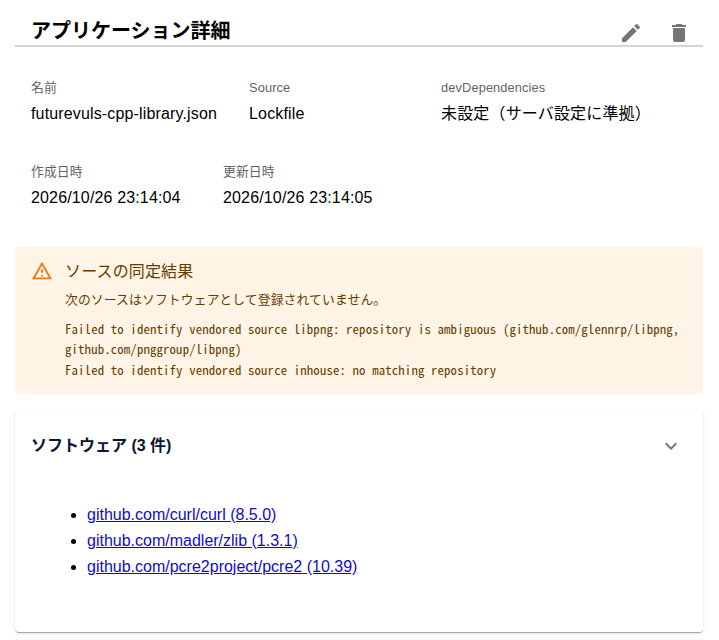
Review identification results on the Applications detail page and through FutureVuls API GET /v1/lockfile/{lockfileID}.
When FutureVuls cannot identify a component, review the error message on the same page or through the API.
Limitations#
File Limits#
Each file can contain up to 50 components.
Each component can contain up to 5,000 hashes.
FutureVuls rejects the entire file when either limit is exceeded.
futurevuls-cpp-fingerprint warns about an exceeded limit but still writes JSON.
Identification Results and Retry#
FutureVuls identifies each component independently. FutureVuls does not register a component when no repository matches, multiple candidate repositories remain, or it cannot identify a version.
When any query to OSV fails, FutureVuls does not register successfully identified components either. Upload the data again when a network error prevents FutureVuls from connecting to OSV.
Libraries Without a CPE#
Even when FutureVuls correctly identifies a repository and version, it does not register a CPE or link CPE-based vulnerability information when NVD or another source has not assigned an official CPE to the software.