2026-10-14 Release Notes#
Scanner update required
This release includes feature improvements that require a scanner update. If your scanner version is outdated, some features may not work correctly, so please update your scanner regularly.
- Scanner bug fixes are applied only to the latest version.
- For how to update the scanner, see here. We also recommend using the automatic update option.
| Target | Scanner Version | Scan Execution Script |
|---|---|---|
| For Linux | [NEW] vuls v0.41.0 | Version: 2025/10 |
| For Windows | [NEW] vuls v0.41.0 | [NEW] Version: 2026/10 |
| Trivy | [NEW] v0.74.0 | [NEW] Version: 2026/09 |
To keep lists responsive even in large environments, this release has made the group set CVE page load significantly faster. It also introduces pagination for the task and software lists, on-demand generation of task CSV reports from the latest data, and features for efficiently retrieving large amounts of data through the list APIs. Some changes affect list operations, displayed columns, and existing workflows. Check "Actions and Impact at a Glance" for the features you use.
Actions and Impact at a Glance#
These are the main changes that affect existing workflows. [Action Required] marks items that require changes to your workflows.
Important Notices#
[Action Required] Organization-Wide Bulk Scans Have Been Discontinued#
We have discontinued "Manual Scan of All Servers" in Organization Settings.
This is because scanning every server in an organization at once can delay the processing of other customers' scan results.
Going forward, use "Manual Scan of All Servers" in Group Settings (up to 500 servers per run; if a run targets more than 100 servers, it may take longer for all scan results to become available).
If you need to scan many servers at once in an emergency, call the FutureVuls API server scan endpoint (POST /v1/server/scan/{serverID}) for each target server (Group API List).
If you run server-level manual scans, paste scans, or SBOM registrations and updates (including the API above) in quick succession, they may be queued per organization, which can slow down responses. With the FutureVuls API, processing continues even if a call times out, so do not resend the same request. For details, see "Queuing for Scans and SBOM Registration".
[Advance Notice] The FutureVuls API List Endpoints Will Use the Cached Total Count by Default (Planned for December 2026)#
To improve performance, we will change the default value of allowCachedCount from false to true in the release planned for December 2026.
After the change, for requests that do not specify the parameter, totalCount and totalPage on the second and subsequent pages (except the last page) may be values from up to 30 minutes earlier.
The total count on the first and last pages, as well as the list contents, remain the latest, as before.
This change applies to the CVE list, task list, software list, and deleted software list APIs (except requests that specify exactCount=false).
If you use the total count on the second and subsequent pages as the latest count, explicitly specify allowCachedCount=false before the change.
If you periodically retrieve all data to replicate it to an external system, also consider the "differential sync API (v2)", which does not use the total count.
For details on the parameters, see "How the total count (totalCount) is calculated".
Main Change: Faster List Screens and List APIs#
The Group Set CVE Page Now Loads Faster (Greater Gains for Larger Group Sets)#
We have addressed the slow loading of the CVE page for large group sets. The more tasks and CVEs a group set has, the greater the improvement.
For a group set with about 500,000 tasks and about 60,000 CVEs, only about a quarter of all CVEs were loaded in 30 seconds before the improvement, whereas all CVEs now load in about 30 seconds (the top of the video shows before the improvement, and the bottom shows after).
For even larger group sets, the approximate time to load all CVEs after the improvement is as follows.
| Group set size (approx. number of servers) | Time to load all CVEs (after the improvement) |
|---|---|
| About 1.5 million tasks and about 150,000 CVEs (about 1,000 servers) | About 50 seconds |
| About 7.6 million tasks and about 170,000 CVEs (about 5,000 servers) | About 1 minute 10 seconds |
Note: These values were measured in our test environment. Actual times vary depending on the number of tasks and CVEs in the group set, and on your device and network.
The Group CVE Page Now Loads Faster#
We have addressed the slow loading of the CVE page for large groups. For example, for a group with about 1,000 servers, the time to load all CVEs has dropped from about 5 minutes to about 1 minute.
Note: These values were measured in our test environment. Actual times vary depending on the number of CVEs in the group.
Task and Software Lists Are Now Paginated#
To keep lists responsive even in large environments, the task lists and software lists for groups and group sets now display results page by page. The software list now lists software as soon as you open the screen, without a search. You can export all software in a group at once with the "CSV Report".
- You can choose to display 30 to 1,000 rows per page, and switch pages with the buttons. You can page through only the first 100,000 rows. To view rows beyond that, narrow them down with a filter.
- CSV output from "Export" includes only rows on the current page. If you select rows, only the selected rows are exported. To download data from all pages, generate a task or software "CSV Report" for each group. Filters and selections on the screen are not reflected in CSV reports.
- Filters apply to all rows, and you can bulk update up to 10,000 matching rows at once.
- You can sort by only one column at a time. For columns such as "Server Name" and "Primary Assignee", you filter by selecting from the candidates that appear.
- The "Software Name" search box and "Conditions to Watch" at the top of the software list have been removed. Use the filter on each column instead.
For details on how to use these features, see "Basic Screen Usage".
Columns removed from the software list and other lists
The "Open Tasks", "Ongoing Tasks", "Completed Tasks", "All Tasks", and "Latest Detection Time" (shown as "Last Update" for groups) columns have been removed from the software list. The "OSS License Type" column has been merged into the filter for the "OSS License" column. The task count columns and the "Last Update" column have also been removed from the software lists in Server Details and CVE Details. For the task count columns in the role list, see "Removal of the role displays".
Task CSV Reports Are Now Generated On Demand from the Latest Data#
Task CSV reports, which previously provided data generated around 8:00 AM daily, are now generated on demand from the latest data.
When you generate a report from the "CSV Report" button in the group task list, we notify you by email when it is ready. You can then download the report from the same "CSV Report" button.
In addition, isImportant (Important CVE Conditions) in the CSV report is now evaluated in the same way as on the screen.
It is now true only for tasks that meet the conditions and are open (their status is NEW and they are not hidden).
Previously, it was true for any task that met the conditions, regardless of whether the task was open. Take note if you aggregate data using this column.
Generate a report on first use and whenever you need the latest data
CSV reports generated daily before this release are not carried over. When you use the feature for the first time after the release, generate a report. "Download Generated CSV Report" does not regenerate the report; it contains the data as of the last generation. If you need the latest data, generate the report again.
For details on how to use this feature, see "CSV Report".
You Can Now Export the Software List as CSV#
We have added a "CSV Report" button to the group "Software" tab, so you can export all software in a group as CSV. As with task CSV reports, we notify you by email when the report is ready. Filters and selections on the screen are not applied to the CSV report.
For details on how to use this feature, see "CSV Report".
You Can Now Choose How the FutureVuls API List Endpoints Calculate the Total Count (totalCount)#
We have added the exactCount and allowCachedCount parameters to the FutureVuls API list endpoints, which let you choose how the total count (totalCount) in the response is calculated.
When you retrieve large amounts of data page by page, you can speed up responses.
allowCachedCount=true: for the second and subsequent pages (except the last page), returns a total count calculated up to 30 minutes earlier. The total count on the first and last pages, as well as the list contents, remain the latest.exactCount=false: caps the total count at 100,000 (allowCachedCountis ignored). This is suitable when a rough total count is enough and you do not retrieve all data.- By default (
exactCount=trueandallowCachedCount=false), the latest total count, calculated every time, is returned as before.
You can specify exactCount in the task list, software list, and deleted software list APIs, and allowCachedCount in those APIs and also in the CVE list API.
For details, see "Counting the Total (totalCount)".
Added a Differential Sync API (v2) for Tasks and Software to the FutureVuls API#
We have added a differential sync API that lets you retrieve only the tasks and software that have changed since your last retrieval. Use it to replicate FutureVuls data to an external system and keep it in sync periodically.
- Lists:
GET /v2/tasksandGET /v2/softwares(Group API),GET /v2/groupSetTasksandGET /v2/groupSetSoftwares(Group Set API) - Counts:
/countfor each of the above (for example,GET /v2/tasks/count)
If you specify the nextCursor from a response as the cursor of your next request, retrieval continues from where the previous one left off.
Keep the following points in mind:
- Deleted tasks, tasks that no longer match the
filterStatuscondition, and software deleted through some paths, such as deleting a manually registered CPE, are not returned. Periodically retrieve all data again and reconcile it. - If the group set configuration or the filter conditions change,
409(sync_reset_required) is returned. Retrieve everything again from the beginning.
For details, see "Differential Sync API (v2)".
In the FutureVuls API, Software and Task Timestamps Are Now Updated Only When Something Changes#
With the addition of the "differential sync API (v2)", we changed when the timestamps returned by the FutureVuls API (v1) are updated.
- Scans and SBOM re-uploads that contain no changes no longer update the last updated time (
updatedAt) of software and tasks. If you retrieve changes based on the last updated time, you may retrieve fewer items than before. - During scans, the CPE assignment time of software (
cpeAssignedAt) is now updated only when the vendor or product of the assigned CPE changes, and is no longer updated by a version change alone.
New Features and Improvements#
You Can Now View the Reachability of Vulnerabilities in Go Applications (Beta)#
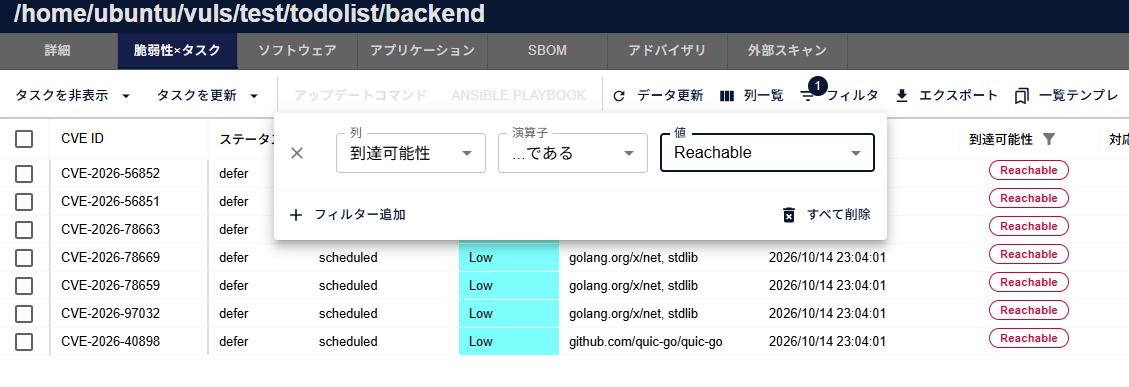
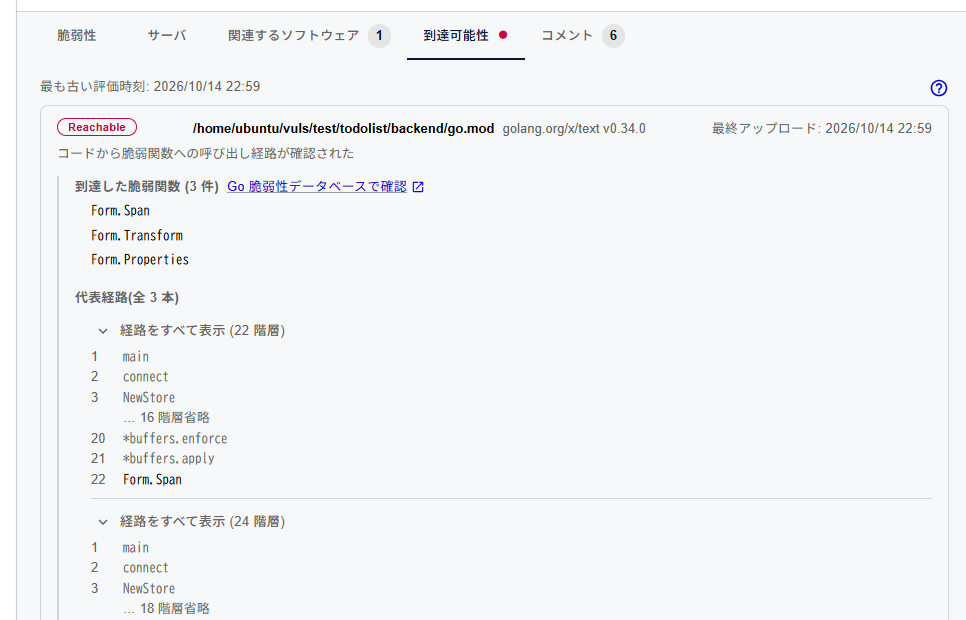
Based on analysis results from your CI, the task list and Task Details now show, for a vulnerability detected in a Go application, whether there is a call path from the application's code to the vulnerable function. You can use this as reference information when prioritizing your response.
- Task statuses are not changed automatically
- Vulnerabilities originating from the Go standard library are not covered
- A vulnerability with no analysis results is "not analyzed"; this does not mean that it is "unreachable"
This feature is available only to organizations subscribed to the CSIRT Plan. For the CI setup procedure and how to read the results, see "Reachability Analysis (Beta)".
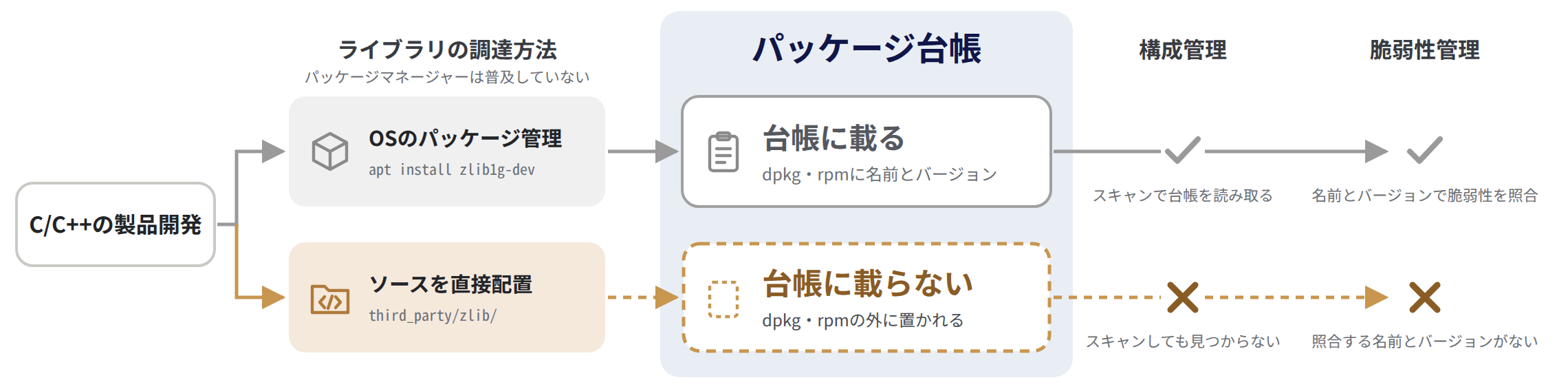
You Can Now Detect Vulnerabilities in Libraries Bundled with C/C++ Source Code#
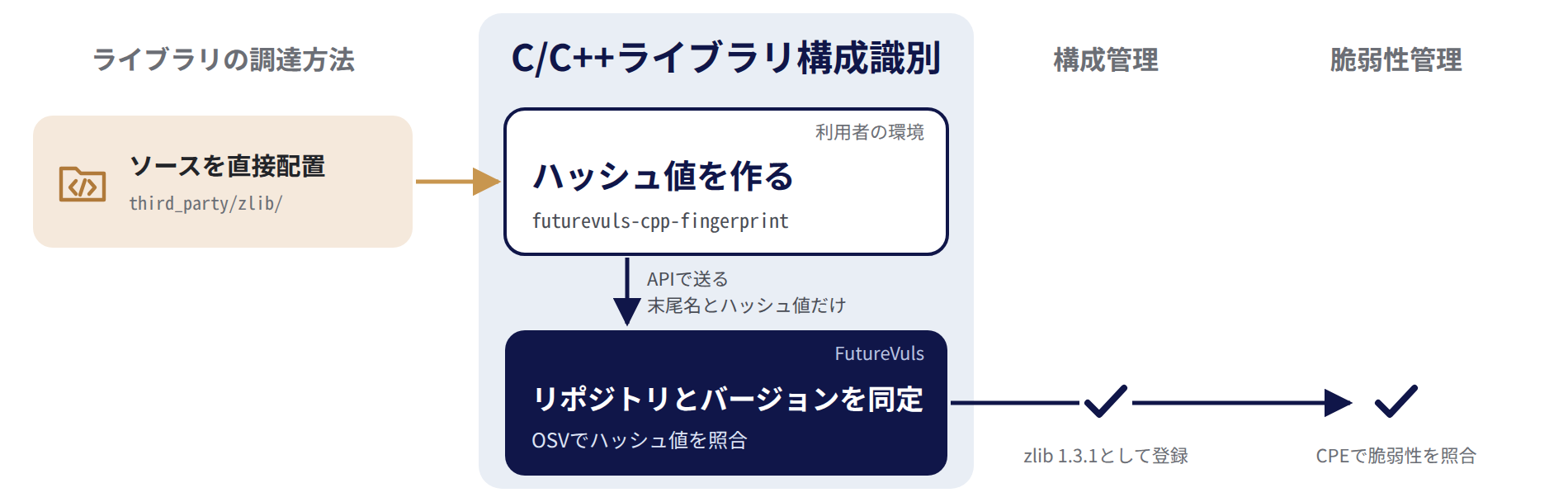
When you use a dedicated command-line tool to hash the source code of a C/C++ project and upload the result to FutureVuls, FutureVuls now identifies the libraries and versions bundled with the source and detects their vulnerabilities. You can review the identification results on the screen and through the FutureVuls API. The libraries that can be identified are C/C++ open-source projects managed in OSS-Fuzz. If no official CPE has been assigned to a library in NVD or elsewhere, FutureVuls does not link it to vulnerabilities even when it can identify the library.
For how to use this feature, see "C/C++ Library Identification".
You Can Now Manage Oracle Solaris Servers with Paste Scan (Beta)#
You can now register Oracle Solaris 10 / 11 (11.0 to 11.4) servers with paste scan. When you run commands on the server to obtain information such as the package list and paste the output into the FutureVuls console, FutureVuls detects vulnerabilities based on the vulnerability information published by Oracle.
- For Solaris 11.3 / 11.4, FutureVuls determines whether a vulnerability has been fixed from the update level included in the version of the
entirepackage. For 11.0 to 11.2, FutureVuls estimates this from the timestamp included in the version of theentirepackage - For Solaris 10, FutureVuls detects vulnerabilities that may affect the installed packages. Because it does not determine whether they have been fixed, detection results remain even after you apply patches
For registration steps and detection details, see "Solaris Paste Scan". For supported versions, see "Supported Environments".
Added the "Vulnerability Detection" Column to the Software List#
We have added the "Vulnerability Detection" column to the software lists of groups and group sets. It shows whether vulnerabilities in each piece of software can be detected (such as "CPE required", "Review CPE", and "Not detectable"), and you can also filter by this column. Use it to find software that needs a CPE assignment or review, or software in which vulnerabilities cannot be detected. "CPE required (Trivy)" is shown only when scanned with trivy-to-vuls v0.41.0 or later.
In addition, the "Assign CPE/PURL" tab of the software details now displays a warning according to the vulnerability detection status.
We have also added vulnDetectionStatus to the responses of the FutureVuls API software list endpoints.
Existing software is displayed as "Not evaluated" until its status is determined by a scan after this release (including scheduled scans), a CPE assignment, or a similar operation.
For the meaning of each status and how to respond, see "Vulnerability Detection Column".
We Have Revised How Windows KBs Are Displayed#
- Older KBs superseded by newer ones are now consolidated under the latest KB on the Advisory tab, and you can check them under "Merged KBs" in Advisory Details. The update commands also target only the latest KB (for existing servers, this is reflected after the next scan).
- For KBs that are not listed in the Microsoft Update Catalog, such as KBs delivered through hotpatching, we now display the support page URL instead of the catalog search URL and indicate that the KB may be a hotpatch. The update commands also display them separately.
For how to apply hotpatches, see "How to Apply KBs Fixed by Hotpatching".
Vulnerabilities in OS Packages Included in Application SBOMs Are Now Detected#
OS packages (rpm / deb / apk, etc.) included in Application SBOMs that you add to an SBOM server are now subject to vulnerability detection (only for SBOM servers whose OS has been identified). You can now also import Application SBOMs that do not specify an OS; their OS packages are imported as packages of the destination server's OS (previously, this resulted in an error).
An SBOM that contains an OS package with the same name as, but a different version from, an OS package in another SBOM on the server results in an error.
On SBOM servers that already have Application SBOMs containing OS packages, more vulnerabilities may be detected in scans after this release. For details, see "Server SBOMs and Application SBOMs".
You Can Now Export SBOMs Without Vulnerability Information#
We have added "Exclude vulnerabilities" to the SBOM download menus in Server Details and the server list.
In line with the approach of BSI TR-03183 and the CRA, you can create an SBOM for submission that contains no vulnerability information, without editing it by hand.
You can produce the same output with the FutureVuls API (GET /v1/server/{serverID}/sbom) by specifying excludeVulnerabilities=true.
For details, see "Exporting SBOMs".
SBOM Import Now Supports the Tool Name "manual" and Dependency-Track#
- If you specify
manualin the SBOM's creation tool information, the tool name is now imported as "manual" instead of "Unknown". This lets you manage manually created SBOMs separately from SBOMs generated by tools. - SBOMs exported from Dependency-Track, an OWASP open source platform for centrally managing SBOMs, can now be imported with the officially supported tool name "dependency-track".
Added the "SBOM" Sub-Tab to Server Details#
We have added the "SBOM" sub-tab to Server Details, where you can view the SBOMs registered to the server as a list and check each SBOM's type, format, included applications, and other details. Accordingly, "Registered SBOM File" on the "Details" sub-tab has been removed. Add, download, update, and rename SBOMs from the "SBOM" sub-tab. Application SBOMs can also be deleted; Server SBOMs cannot.
For details, see "Importing SBOM Files".
Removed UUIDs from Application Names Derived from SBOMs and Added the "SBOM file name" Column#
The SBOM UUID that was included in the names of applications imported from SBOMs (for example, OS Application | ea36c8d1-…) is no longer displayed.
Instead, we added "SBOM file name" to the application list, the software list, and their details, so you can check which SBOM an item was imported from (you can also filter by it in the group software list).
In the CSV report of the software list, location is output as the name without the UUID, and columns for the SBOM file name and UUID have been added.
In the FutureVuls API, the values of the existing fields (location / path / name) do not change.
Fields such as the SBOM file name are added to data derived from SBOMs, and you can now filter the lockfile list by SBOM.
For details, see "View Source SBOM Files".
The Default SBOM File Name Is Now the Uploaded File Name#
When you upload an SBOM file from the screen to register a new SBOM, the default SBOM file name is now the name of the uploaded file (up to the first 50 characters) instead of the <tool name>-<UUID> format.
The names of SBOMs registered by pasting text or through the Amazon Inspector integration, and of already registered SBOMs, do not change.
We also fixed an issue where updating an SBOM by uploading a file reverted the SBOM file name to the <tool name>-<UUID> format.
The SBOM file name no longer changes when you update an SBOM file.
For details, see "Importing SBOM Files".
SBOM Import Error Messages Now Indicate the Cause#
The error uniformly displayed as "Failed to decode SBOM" when an SBOM import failed is now displayed as a message specific to the cause, along with how to resolve it. For how to resolve each error, see "Import Specifications > Troubleshooting".
You Can Now Import SBOMs Whose OS Cannot Be Determined by Excluding OS Packages#
We have added the "Ignore OS information" checkbox to the SBOM import dialogs. When enabled, you can import SBOMs whose OS cannot be determined (SBOMs that contain OS packages but no OS information, or SBOMs for an OS that FutureVuls does not support) without their OS packages. Previously, these SBOMs resulted in an error and could not be imported.
The checkbox is disabled by default.
OS packages that were not imported are not subject to vulnerability detection, and if you import the SBOM as a Server SBOM, the server's OS becomes "Pseudo".
In the FutureVuls API, you can specify this with ignoreOS.
For details, see "Importing SBOMs Whose OS Cannot Be Determined".
Screen Display Improvements#
- We have moved the SSVC Priority in Task Details to the top of the screen, so you can see the response priority at a glance.
- We have updated the layout of detail pages, such as the task, CVE, and server detail pages, to organize information more clearly ("Task Details", "CVE Details", and "Server / Product Details").
- We have added "PSIRT Help" to the menu that opens from the help icon at the top right of PSIRT screens, so you can open the PSIRT manual directly from the screen.
You Can Now Retrieve the Last Comment via the Supply Chain Risk API#
The FutureVuls API endpoints that retrieve supply chain risks now return the body, author, and posting date and time of the last comment.
We also fixed an issue where a deleted comment continued to appear as the "Last Comment" on the supply chain risk screen and in the API after you deleted the latest comment.
MCP Server Access Is Now Distinguishable in the Audit Log#
FutureVuls API calls made via the MCP Server are now recorded in the audit log with the MCP: prefix on the endpoint name (for example, MCP:Server list), so they can be distinguished from normal API usage (for example, API:Server list). Entries for MCP Server access recorded before this release remain as API: and are not changed.
For details, see "MCP Server Integration".
More Information Is Now Displayed and Recorded in English#
When you use FutureVuls in English, AI summaries (Vulnerability Summaries and Threat Information Summaries) and audit log operation names are now also displayed in English. Summaries that have not been translated yet are displayed in Japanese. When the organization language is English, text that FutureVuls records automatically, such as system comments, reasons for EOL and malicious package risks, and error messages in the scan history, is also recorded in English. Recorded text follows the organization language. On the other hand, changes to vulnerability information shown in task comments and the label for groups you do not have permission to view are shown in the viewing user's display language.
System comments and other text recorded before this release remain in Japanese. However, for organizations using English, the reasons for EOL and malicious package risks are also rewritten in English at the first scan after the release (if you change the language setting, they are rewritten at the first scan after the change; for some EOL reasons with no Japanese version, see "Display of EOL reasons with no Japanese version"). Risks whose reasons are rewritten are counted as updated risks in the Monthly Group EOL Notification and Monthly Group Set EOL Notification, but no update notifications are sent and no system comments are added.
For the covered text and how the language is determined, see "Language Settings". For the impact on the FutureVuls API and the MCP Server, see "FutureVuls API and MCP Server responses".
Updated the Information Used to Determine EOL#
We updated the information used to determine whether an OSS library is a confirmed EOL (EOL-Confirmed) with the results of our investigations since the scheduled release on 2026-06-03. Depending on the OSS libraries you use, this update brings the following changes.
- For libraries newly determined to be confirmed EOL, EOL supply chain risks are created, and notifications for newly created risks are also sent.
- For libraries that are no longer considered confirmed EOL (for example,
better_htmlon RubyGems), the status of the risks is automatically changed to CLOSED (including risks you had changed to RISK_ACCEPTED or another status), and a system comment stating the reason is added. - Risks whose EOL Deadline was shown as "Expired" now show the EOL date when it has been identified. Settings such as the status and assignees are carried over, and a system comment showing the deadline before and after the change is added.
- The "Successor" field in Software Health now shows the successor identified by our investigation (for example, "AWS SDK for Java 2.x" for
aws-java-sdk-elasticinference).
The changes are reflected at the scan (including SBOM updates) after FutureVuls rechecks the evaluation of each library in turn, so it takes at least about 7 days for them to reach all libraries. Going forward, this information will be updated irregularly, separately from FutureVuls releases, whenever we review our evaluations. Each update may likewise create new risks or automatically change them to CLOSED.
Released v2 of the GitHub Action fvuls-lockfile-uploader#
We have fixed the runtime error in futurevuls/fvuls-lockfile-uploader and released it as v2. For setup instructions, see "How to Automatically Update a Lockfile on Push with GitHub Actions".
Changes and Discontinuations of Existing Features#
We Have Revised the Vulnerability Detection Logic for Windows and CPE#
To improve detection accuracy, we have revised the vulnerability detection logic for Windows and CPE. As a result, detection results may change for some vulnerabilities.
Windows#
A vulnerability is now detected when it cannot be confirmed that the KB that fixes it has been applied. Previously, only vulnerabilities corresponding to KBs confirmed as not applied were detected. In addition, new vulnerabilities may be detected in Microsoft Edge (now evaluated against the installed version) and in Microsoft products other than the OS, such as Teams, while vulnerabilities already fixed by an applied cumulative update, among others, may no longer be detected.
CPE#
We discontinued approximate matching (fuzzy matching) that was performed when versions could not be compared strictly, reducing false positives. We also made it possible to correctly match versions that contain letters, such as OpenSSL 1.1.1n.
The FutureVuls API CPE Deletion Endpoints Can Now Delete Only Manually Registered CPEs#
We fixed an issue where specifying the ID of an OS package, library, or other software registered from a scan or an SBOM in the FutureVuls API CPE deletion endpoints (DELETE /v1/pkgCpe/cpe/{cpeID} and the deprecated DELETE /v1/pkgCpe/cpe) deleted that software along with its related tasks.
From now on, specifying the ID of anything other than a manually registered CPE (software whose software type is Private Package) results in an error. You can still delete CPEs from the screen as before.
For Organizations Using English, Some FutureVuls API and MCP Server Responses Are Now in English#
When the organization language is English, FutureVuls API and MCP Server responses change as follows.
- Comments on tasks and supply chain risks: system comments recorded after this release are in English.
- Audit logs (
GET /v1/org/auditLogs): operation names (endpoint) are in English (for example,API:Server list). Entries recorded before this release are also returned in English, so take note if you aggregate or evaluate entries by operation name. - Supply chain risks: the reason for EOL and malicious package risks (
detectionDescription) is rewritten in English at the first scan, and the update timestamp (updatedAt) is updated. If you import differences based on the update timestamp, the affected risks are retrieved as updated. - Group set CVE details (
GET /v1/groupSet/cve/{cveID}): now handled in the same way as group CVE details. AI summaries that have an English translation are returned in English, and JVN information and JPCERT alerts are no longer included. JVN is no longer considered for the maximum CVSS (cvss), so the value may change.
Removed the "Target System Security Requirements" Setting and Task Count Columns from Roles#
As announced in the 2026-06 release, we have removed the "Target System Security Requirements" (CR, IR, and AR) setting from Role Details. This setting was not reflected in CVSS score, CVE Priority, or SSVC calculations, or in notifications.
We have also removed the CR, IR, and AR columns and the task count columns from the role list. The role list now shows the Role ID, Role Name, and Total Servers. For the FutureVuls API changes, see "Role endpoint field removal".
Removed the Task Count Fields from the FutureVuls API Role Endpoints#
We have removed the task count fields (newTaskCount and allTaskCount) from the responses of the FutureVuls API endpoints that retrieve the role list and role details (GET /v1/roles and GET /v1/role/{roleID}).
If you reference these fields, specify filterRoleID in the task list API (GET /v1/tasks) and use the total count (totalCount) retrieved with the following conditions instead.
- Instead of
newTaskCount: setfilterStatustonewandfilterIgnoretotrue - Instead of
allTaskCount: setfilterStatusto all statuses (by default,filterStatusincludes onlynew,investigating, andongoing)
VulsDB Has Been Discontinued#
Due to low usage, we have discontinued "VulsDB" (https://cve.vuls.biz/), the website that summarized the detection conditions for each vulnerability.
We Have Revised the Scope and Content of Vulnerability Summaries#
Vulnerability Summaries are no longer generated for CVEs for which NVD and vendors have not published a vulnerability description, such as rejected CVEs.
In addition, Vulnerability Summaries no longer include information that changes over time, such as EPSS and exploitation status. For the latest information, check "Threats & Exploitation" in the CVE Details.
These changes do not apply to summaries that have already been generated.
For details, see "LLM Vulnerability Summary".
We Have Revised the Log Messages Output by the Scan Execution Scripts and Installers#
We have corrected errors in the English messages output by the scan execution scripts and installers for Linux, Windows, and Trivy (for example, Already exist. → Already exists.).
Their processing does not change, but if you monitor or search logs based on these messages, review your conditions.
Messages from the scan execution scripts change after you update the script.
Bug Fixes#
Fixes that may affect existing data or statuses are listed first.
Fixed an Issue Where the EOL Deadline Was Incorrectly Determined for Software Matching Multiple Support Cycles#
We fixed an issue where, when matching against EOL information from endoflife.date, the EOL deadline of a broader cycle was applied if the software version matched multiple support cycles. For example, .NET Framework 4.6.2 was evaluated with the EOL deadline of the 4.6 cycle (2022-04-26) instead of that of the 4.6.2 cycle (2027-01-12). The EOL deadline of the cycle that matches the version most specifically is now applied. The fix takes effect from the next scan (including SBOM updates). Servers that are not scanned and whose SBOMs are not updated keep the previous evaluation.
EOL supply chain risks are reopened when their evaluation changes
When the fix takes effect, the EOL supply chain risks of software whose evaluation changed are reopened with the new evaluation, and their status returns to NEW. Statuses you had changed, such as RISK_ACCEPTED, and the Primary Assignee, Scheduled Date, and Due Date settings are not carried over (the Primary Assignee is reset to the server assignee). Notifications for newly created risks are also sent. Risks are also reopened when only the matched cycle changes and the EOL deadline stays the same. Set the response policy for the affected risks again.
Fixed an Issue Where OS Package Detection Results Differed Depending on How the SBOM Was Registered#
We fixed an issue where, unlike SBOMs uploaded from the screen, CPEs / PURLs were not assigned to OS packages in SBOMs registered via the FutureVuls API or Paste Import. As a result, more vulnerabilities may be detected in SBOMs registered through these methods.
Precautions for the first update of affected existing SBOMs
For server SBOMs registered or updated through the FutureVuls API or Paste Import before this release, the fix takes effect on the first update after this release. OS packages are re-registered during this first update, so CPEs and tags manually assigned to OS packages are not carried over. Vulnerabilities are detected again during the same update. From the second update onward, information for unchanged OS packages is retained.
Fixed an Issue Where Due Dates of Special Alert Tags and Private CVEs Were Displayed as "1970-01-01", and Other Issues#
"Decision Date" is now a required field when you register or edit a special alert tag.
We fixed an issue where saving a special alert tag or a private CVE with an empty due date stored the due date as 1970-01-01, which was then displayed as "1970-01-01" on the screen, in notifications, and in daily reports. From now on, saving with an empty due date means no due date.
Correcting existing 1970-01-01 due dates
For special alert tags that already show 1970-01-01, the due date appears empty on the edit screen. If you change the decision date or another field and save the tag again, the due date is removed, including the due dates of the linked tasks.
We also fixed the following issues:
- Simply saving a special alert tag again without changing its due date overwrote the due dates of tasks in the organization that have the same CVE (including manually set due dates) and added system comments
- Deleting the milestone or due date of a PSIRT response did not add a history comment indicating the deletion
Fixed an Issue Where Linux OS Packages Were Detected as EOL Supply Chain Risks on Their Own#
We fixed an issue where, on Linux servers registered through SBOM import or the Amazon Inspector integration, OS packages (for example, python 2.7.18 on Amazon Linux 2) were detected as EOL supply chain risks separately from the OS itself.
Because the support period of Linux OS packages follows the lifecycle of the OS itself, they are no longer detected individually.
Risks that were already detected are automatically changed to CLOSED when the SBOM is updated or vuls scan results are uploaded (including risks you had changed to RISK_ACCEPTED or another status), and a system comment explaining the reason is added.
Servers integrated with Amazon Inspector are updated by periodic synchronization, but for servers whose SBOM was uploaded manually, the risks are not automatically changed to CLOSED until you update the SBOM.
Software registered as private EOL information and RHEL Application Streams are still detected as before.
For details, see "Handling of OS Packages".
Fixed an Issue Where the "Patch Availability" of Tasks Differed Depending on the Screen or Retrieval Method#
We unified the criteria for determining the "Patch Availability" of tasks across the screen, CSV reports, and the FutureVuls API. As a result, the display changes for some tasks. For example, tasks from the Amazon Inspector integration that were shown as "✓" even though no fixed version information was available are now shown as "?".
Fixed an Issue Where Detection Results and Tags Temporarily Disappeared When Updating an SBOM#
We fixed an issue where, when an SBOM was updated via Paste Import or the FutureVuls API (PUT /v1/sbom/{sbomID}), the detection results, tags, and manually assigned CPEs of unchanged software temporarily disappeared. The information for unchanged software is now retained after the update.
For the first update of affected existing server SBOMs, review the "first-update precautions".
Fixed an Issue Where Two Settings Were Saved with the Same Value When Registering a Cloud One Integration#
We fixed an issue where, when you registered a new Cloud One integration, the value of the "Automatic Policy Creation" setting was also saved to the "Intrusion Prevention Rules / Auto-triage" setting. For example, if you registered with only "Automatic Policy Creation" disabled, "Intrusion Prevention Rules / Auto-triage" was also disabled. If you changed and saved the settings after registration, the correct values were saved.
Check the settings of any group you have not re-saved since registration
In the group settings, open "External Integration" and check whether the two Cloud One integration settings are as intended. If they are not, change the settings and save them.
Fixed an Issue Where the "Last Comment" in the Task List Did Not Match the Actual Comments#
We fixed an issue where the "Last Comment" column in the task list did not match the actual latest comment after a bulk update of tasks with a comment, a comment deletion, or a task copy to another group. Entries that were already out of sync have also been corrected. Tasks that still showed a "Last Comment" even though all of their comments had been deleted now show a blank "Last Comment".
Fixed an Issue Where the Operation Names of Some FutureVuls API Calls Were Recorded as Empty in the Audit Log#
We fixed an issue where the operation name was recorded as empty in the audit log for calls to some FutureVuls API endpoints, such as adding server tags and bulk updating tasks. Operation names are recorded for calls made after this release (entries already recorded are not changed).
Fixed an Issue Where the Audit Log Count Included Logs from All Periods#
We fixed an issue where the count in the audit log list, on the screen and in the FutureVuls API (GET /v1/org/auditLogs), included logs from all periods instead of only the last two years that can be displayed.
For organizations that have logs older than two years, the count now matches the number of rows that can actually be displayed or retrieved.
For the period that can be displayed and retrieved, see "Audit Log".
Fixed an Issue Where the "Update Commands" Button Could Not Be Clicked When Windows Tasks Were Selected in the Task List#
We fixed an issue where the "Update Commands" button remained disabled when you selected tasks for Windows servers in the group task list. For details, see "Update Command".
Fixed an Issue Where the Scanner Was Downloaded Again on Every Windows Scan in Proxy Environments#
We fixed an issue where, in Windows scans configured with a proxy, only the check for the latest scanner version did not use the proxy and failed, so the scanner was downloaded again on every scan even when the latest version was already in use. The fix is included in the scan execution script. If you have configured a proxy, update the script by following "Updating the Scan Script".
Fixed Issues Where Japanese Notifications and Information Were Shown When Using FutureVuls in English#
- We fixed an issue where Slack / Teams notifications were sent in Japanese even when the organization language was English.
- We fixed an issue where notification emails about updates to tasks, supply chain risks, and PSIRT responses listed changes in Japanese, even for users who view FutureVuls in English.
- We fixed an issue where users receiving notification emails via CC or BCC received them in the language of the To users. They now receive them in their own language (except for notifications sent in the organization language). Because emails are sent separately for each language, the To and CC fields show only users of the same language as that email.
- We fixed an issue where the Daily/Weekly Report emails showed CVE titles in the organization language instead of the recipient's language.
- We fixed an issue where, when you viewed the screen in English, Japanese titles, scores, and links from JVN were sometimes displayed on CVE details and task details (in the FutureVuls API, this applies when the organization language is English). For CVEs whose only title comes from JVN, the title is left blank.
We also fixed an issue where the order of the change lines in notification emails for PSIRT response updates was not consistent. For how notification emails are sent to each recipient, see "Email Notifications".
Fixed an Issue Where EOL Reasons with No Japanese Version Were Not Marked as English Information for Organizations Using Japanese#
Even when the organization language was Japanese, English reasons were displayed as they were for EOLs whose detection method is futurevuls and that have no Japanese reason.
These reasons are now shown with the Japanese prefix メンテナ/上流の情報(英語): ("Maintainer/upstream information (English):") before the English reason (the reasons are not translated).
When registry or repository information is available, a note pointing to its official documentation is appended at the end, as before.
The display switches gradually, starting at the first scan after FutureVuls regenerates the reason text.
For risks whose reason switches, the reason (detectionDescription) and update timestamp (updatedAt) retrieved through the FutureVuls API or the MCP Server change, and the monthly EOL notifications count them as updated risks (no update notifications are sent and no system comments are added).
Other Bug Fixes#
- We fixed an issue where registering a large SBOM of tens of megabytes or more resulted in a timeout error (504).
- We fixed an issue where, when you enabled "CPE Auto Assignment" individually for software to which a CPE had been assigned manually, the CPE Assignment Type was displayed as "Auto". We have restored existing data in this state to the manually assigned state.
- We fixed an issue where the "Reliability of Exploit Code (E)" and "Severity of Security Alert" conditions were not displayed when checking the "Important CVE" conditions on the CVE tab (they were correctly used to sort vulnerabilities).
- We fixed an issue where the "Source" column in the application list on Server Details displayed "Trivy" for applications registered from a lockfile.
- We fixed an issue where some errors in the AWS SSM command history were displayed as error codes such as
ErrInvalidSSMDocument. Errors after this release are displayed as messages in the organization language. - We fixed an issue where copying tasks (Copy Task Information from Another Server, Move Server Information to Another Group) also copied the system comment for tasks hidden because the package is "Not managed".
- We fixed an issue where additions and deletions of vulnerability information on the same day were shown as separate task comments. Changes on the same day are now combined into one comment, shown with the time of the first change that day.
If you have any questions, please contact our support team.