Preview
This guide is a preview. Its content may change.
Register via Amazon Inspector Integration#
Read Only the Method You Use
This method imports findings from Amazon Inspector, the AWS vulnerability management service, into FutureVuls. You don't need to install a scanner on your servers. If Amazon Inspector is enabled in your environment, you can register resources just by configuring the integration.
Suitable Environments#
- Amazon EC2 instances with Amazon Inspector enabled
- AWS Lambda and container images in Amazon ECR
Even for EC2 instances where you can't place a scanner and that can't be reached over SSH, you can manage vulnerabilities in your resources running on AWS all in one place, without installing agents such as Trivy. Integrated servers are synced regularly and kept up to date automatically.
Setup Flow#
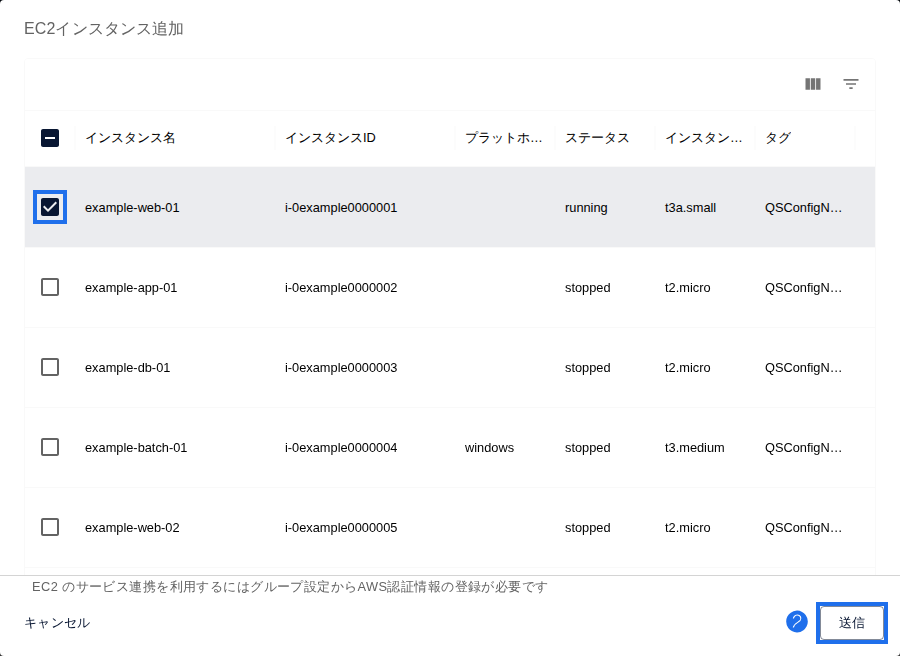
As a prerequisite, enable Amazon Inspector and configure AWS authentication (AWS Integration Authentication Settings). The IAM policy requires the inspector2:ListCoverage and inspector2:ListFindings permissions. For EC2, use either the SSM Agent configuration or agentless scanning. Windows EC2 instances are also supported. In FutureVuls, open the Server / Product tab, click "Add Server", select "Add EC2 Instances", and then select and register the instances you want to integrate (Inspector Integration).
- On the AWS side, configure access so that FutureVuls can read Amazon Inspector findings.
- On the FutureVuls side, configure the integration.
- When the sync finishes, the integrated resources appear in the server list.
Good to Know#
- Support periods for Linux OS packages follow the lifecycle of the OS itself. Since the October 2026 release, OS packages are no longer detected as EOL risks on their own.
- The "Patch Availability" column shows "?" when no fixed version information is available.
Troubleshooting#
If something isn't working, see Troubleshooting (FAQ).
If that doesn't solve the problem, contact us through the support contact form. Including your integration settings (excluding credentials) and the error message helps us investigate faster.
Learn More#
Next Page#
When registration is complete, check your progress in the "After You Register All Servers in the Initial Scope" section of Setup 2: Register Servers and Products.