2026-11-05 Hotfix Release Notes#
The 2026-11-05 Hotfix release now consolidates notifications for actively exploited vulnerabilities per group instead of sending them per server. For example, if a vulnerability already detected on 300 servers in one group is newly added to KEV (a catalog of vulnerabilities that are actually being exploited), you now receive 1 notification instead of 300. Notifications may still be sent per server in some cases, such as when scan results are imported (see how notifications are grouped and when they arrive). In addition, when a vulnerability that you have already detected is newly added to KEV, its tasks are updated without waiting for re-matching, and a notification is typically sent within 30 minutes. If you have any questions about the release contents, please contact our support desk.
Actions and Impact at a Glance#
[Action Required] marks items that require changes to your workflows.
| Who Is Affected | Items to Review |
|---|---|
| Users who receive emails in Japanese and sort them by subject or process them automatically (for example, to create tickets) | [Action Required] Change to the subject |
| Users who receive Slack or Teams notifications in Japanese and process them automatically by their headings | [Action Required] Change to the headings |
| Users on the CSIRT or Standard Plan who want to receive this notification without waiting for the bulk change | [Action Required] Turn it ON for each destination. The defaults do not change in this release. For the steps, see the 2026-10-27 release notes. "Slack Webhook (Deprecated)" receives it as long as it is registered |
| Users on the CSIRT or Standard Plan whose notification email addresses have this notification OFF | [Advance Notice] It will be turned ON in bulk soon |
| Everyone else | No action is required |
2026-11-05 Release Notes#
Notifications for actively exploited vulnerabilities are now consolidated per group#
Background#
If a single vulnerability was found on many servers, as many notifications as there were servers arrived in a short period, and it could become hard to keep up with them. We have implemented the change to consolidate notifications that was announced in the 2026-10-27 release.
flowchart TB
    subgraph after["Starting with this release"]
        A2["A vulnerability detected<br>on 300 servers in one group<br>is added to KEV"] --> B2["1 notification<br>(per group)"]
    end
    subgraph before["Before"]
        A1["A vulnerability detected<br>on 300 servers in one group<br>is added to KEV"] --> B1["300 notifications<br>(one per server)"]
    end
How notifications are grouped and when they arrive#
| What detected it | Grouping | When it arrives |
|---|---|---|
| A vulnerability that you had already detected was newly added to KEV | Per group | Typically within 30 minutes of being added to KEV (KEV is checked every 15 minutes) |
| A vulnerability already listed in KEV was detected later by a scheduled automatic scan (pseudo servers, etc.) | Per group | Once, after matching for all the servers of that group has finished. For the nightly scans, around the end of the nightly matching; it may be the morning if processing is delayed |
| A vulnerability already listed in KEV was detected later when more than 100 servers were scanned or re-matched at once (a scan of all servers in a group counts only when there are more than 100) | Per group | Once, after matching for all the servers of that group has finished. It may take several hours when there are many servers |
| A vulnerability already listed in KEV was detected later by importing scan results (from the scanner, paste, SBOM, Amazon Inspector, etc.), a manual scan of a single server, or a bulk scan or re-matching of 100 or fewer servers | Per server, as before | Each time scan results are imported or a scan runs |
The "100 servers" in the table is the total number of servers scanned or re-matched together.
For re-matching that FutureVuls runs automatically (for example, when the vulnerability database is updated), the number is determined by how FutureVuls processes the re-matching, so notifications may be consolidated per group even for a group with only a few servers.
You cannot choose whether notifications are consolidated per group or sent per server.
The Immediate task notification for a task whose SSVC Priority becomes Immediate is a separate notification and is still sent per server, as before.
Occasionally, the same notification may arrive twice, or the notifications for one run may arrive split into more than one.
Email subject and Slack and Teams headings#
When the recipient's language is Japanese, the email subject and the Slack and Teams headings change to Japanese. If you sort or process them automatically by subject or heading (for example, to create tickets), please review your rules. The same applies to notifications sent per server.
| What changes | Before | After |
|---|---|---|
| Email subject | [FVuls] Actively Exploited Vulnerability Report (<organization name> / <group name>) |
[FVuls] 悪用されている脆弱性の検知通知(<organization name> / <group name>) |
| Teams title | Actively Exploited Vulnerability Report (<organization name> / <group name>) |
悪用されている脆弱性の検知通知(<organization name> / <group name>) |
| Heading of the email, Slack, and Teams message body | FutureVuls Actively Exploited Vulnerability Report |
FutureVuls 悪用されている脆弱性の検知通知 |
The [FVuls] prefix of the email subject does not change.
The heading for each vulnerability (Actively Exploited (CVE ID)) remains in English.
In Slack, when there is only one vulnerability, the post starts with the heading for the vulnerability, and the message body heading appears only in places such as notification previews (except for "Slack Webhook (Deprecated)").
The recipient's language follows these settings (see Language Settings):
- Emails sent to users: Browser language settings
- Emails sent to notification email addresses, Slack, and Teams: Organization language settings
What notifications look like and include#
Email and Teams receive one notification per group, and Slack receives one post per group. In Slack, when there are two or more vulnerabilities, the details of each vulnerability are added as replies in the thread of that post. If you set the notification scope of email to users to "Task assignees", each assignee receives one email that includes only the tasks for which they are the primary or secondary assignee.
What each notification includes, per vulnerability:
- A link to the vulnerability page
- Server names with links to their tasks (up to 5; the rest are shown as "and N more servers" with a link to the task list for that vulnerability), and related packages
- KEV and EUVD information
The number of servers in a notification may differ from what you see on the screen
Each notification includes only the tasks that were newly treated as actively exploited vulnerabilities in that run. Tasks × Servers in Vulnerability Details and the task list linked from "and N more servers" also show tasks that were already treated as such, so the number of servers may not match the notification.
Notifications that are still sent per server also change to this format. However, notifications sent per server also include the task due date (if one is set). Notifications consolidated per group do not include due dates, so please check them on the task screen. "Slack Webhook (Deprecated)" receives the details of each vulnerability as attachments when there are two or more vulnerabilities. For a single vulnerability, it receives only the heading, as before.
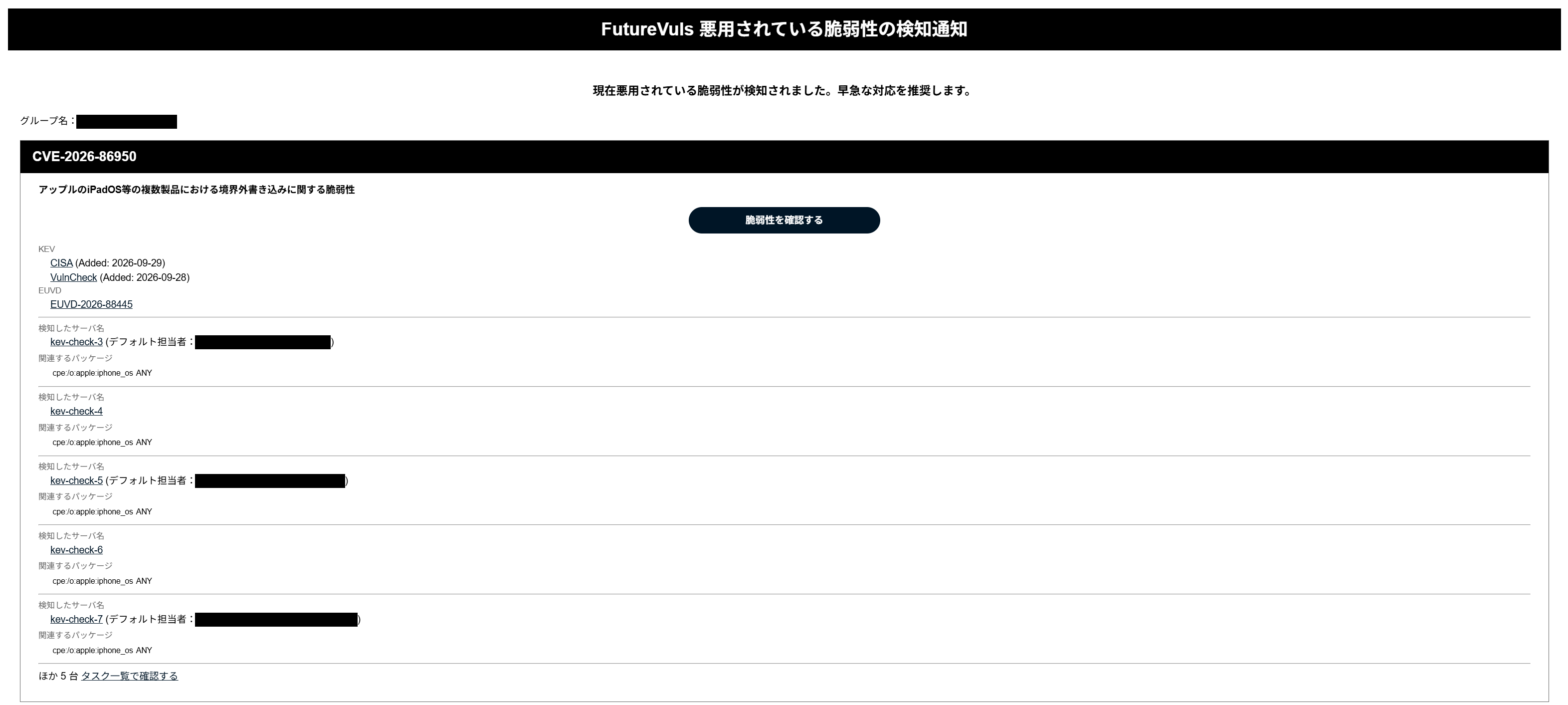
The format of the notifications may continue to change.
If you process notifications automatically, please use the task list of the FutureVuls API (filterIsActivelyExploited=true) instead.
If you do not specify filterStatus, only tasks whose status is new, investigating, or ongoing are returned. To get the same range as the notifications, specify all statuses other than patch_applied in filterStatus.
Limits on what is included#
Vulnerabilities beyond the first 20 are not included in the notification
Each notification includes up to 20 vulnerabilities, and the 21st and subsequent vulnerabilities are not notified later either. If a notification says that there are more than 20, there are more actively exploited vulnerabilities. Check them by using the link in the notification or the CVE Tab (see below).
- Each notification includes up to 20 vulnerabilities. Previously the limit was 20 per server; for notifications consolidated per group, it is 20 for the whole group.
- If there are more than 20, the notification includes the first 20 after sorting them by the date they were added to KEV, newest first (and, for the same date, by the number of servers covered by the notification, most first). It also says so and includes a link that opens the vulnerability list filtered by security alert.
- To check the vulnerabilities that were not included, use this link, or filter "Security Alert" by "Critical" or "Exploited in ransomware campaigns" in the CVE Tab. The list also shows vulnerabilities that were already being exploited before.
- All related packages are included for a vulnerability found on one server. For a vulnerability found on two or more servers, up to 5 related packages are included per server.
- If a Teams notification exceeds the size limit for a single message, packages and other details are omitted to leave only the server names, and if it still exceeds the limit, only the number of servers.
- To see the list of servers and packages, see Tasks × Servers in Vulnerability Details (tasks that are completed or hidden are not displayed).
When a vulnerability you have already detected is newly added to KEV, tasks are updated without waiting for re-matching#
In the 2026-10-27 release, when a vulnerability that you had already detected was newly added to KEV, its tasks were treated as actively exploited vulnerabilities only after the previous scan results were re-matched. Starting with this release, the tasks are treated as actively exploited vulnerabilities as soon as FutureVuls checks KEV (every 15 minutes). The notification typically arrives within 30 minutes of the vulnerability being added to KEV. It may take longer, for example when many vulnerabilities are added to KEV at once. These times are estimates and do not guarantee when the notification arrives.
flowchart LR
    A["Added to KEV"] -- "Up to 15 minutes<br>(checked every 15 minutes)" --> B["FutureVuls checks KEV<br>and updates tasks"] -- "About 7 minutes" --> C["Notification arrives"]
Even if there are many target servers and re-matching takes time, tasks are normally updated and notified in the same amount of time. Occasionally, a task that could not be updated because of overlapping processing is updated at the next re-matching or the next import of scan results.
- Scanner, paste, and SBOM servers are also covered, regardless of plan. Vulnerabilities detected by Amazon Inspector are covered as well.
- Tasks whose status is
PATCH_APPLIEDare excluded. - When re-matching is performed, no duplicate notification is sent for the same task.
- The Immediate task notification for a task whose SSVC Priority becomes
Immediateis sent per server at the point of re-matching, as before. Only the notification for actively exploited vulnerabilities is consolidated in this release. - The SSVC Priority and due date, and SSVC-based auto triage, are updated at the point of re-matching, as before. The target servers are as described in the 2026-10-27 release notes and have not changed.
Upcoming Releases#
The notification will be available on all plans and enabled by default#
We still plan to make notifications for actively exploited vulnerabilities available on all plans and enable them by default in the near future. For details, see the 2026-10-27 release notes.
We are changing one point from the 2026-10-27 release notes.
This bulk change will also change the settings of notification email addresses in organizations on the CSIRT and Standard Plans: notification email addresses for which this notification is OFF will be turned ON. The 2026-10-27 release notes stated that the settings of notification email addresses would not be changed. When this notification was introduced, we turned it OFF for all notification email addresses already registered in organizations on the CSIRT and Standard Plans, so we will turn them ON as part of this change. Settings that you have turned OFF yourself are also included in this change. If you do not need the notification, you can turn it OFF in the notification email address settings after the change.